
Home / News / Google Search Console Multimodal Filter – What It Means for Small Biz
Google Search Console Multimodal Filter – What It Means for Small Biz
Google Search Console now includes a **Multimodal** filter that separates image‑based searches from traditional text queries. This lets local businesses see how much traffic comes from visual tools like Google Lens, image uploads, and Chrome’s “Search this image” feature, and adjust their SEO strategy accordingly.
Key Highlights
- ✓New Multimodal filter separates image‑based queries from text searches in GSC.
- ✓Tracks traffic from Google Lens, Circle to Search, image uploads, and Chrome’s image search.
- ✓Provides clicks, impressions, CTR, and position for visual queries.
- ✓Enables businesses to optimize images, schema, and local listings for AI‑driven discovery.
What Happened
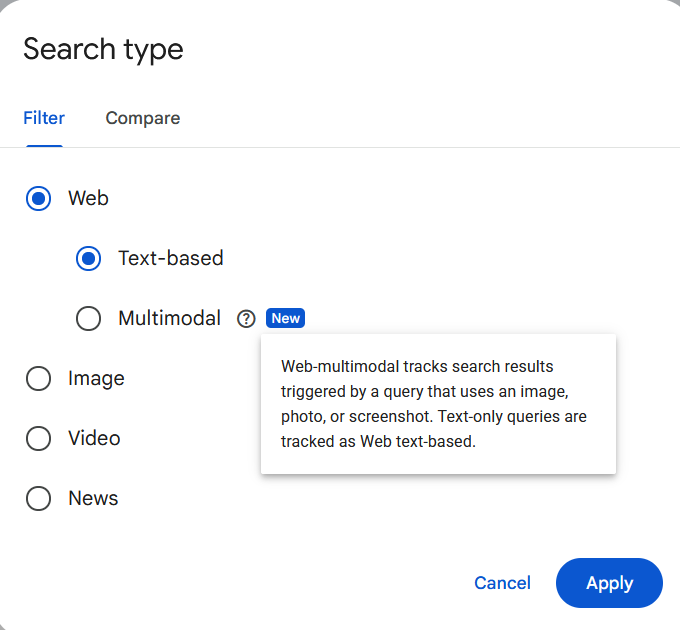
On September 24, 2026, Google introduced a Multimodal filter within the Search Console Performance report. In the Search type dropdown under the Web tab, two options now appear: Text‑based and Multimodal. This isn’t merely a cosmetic tweak—it unlocks a data set that was previously hidden inside the generic “Web” results.
Google describes Web‑multimodal traffic as originating from queries that contain an image, photo, screenshot, or any other visual input. By contrast, Web‑text‑based captures the classic typed queries we’ve measured for years. The new filter records activity from features such as:
- Google Lens (mobile visual search)
- Circle to Search on Android devices
- Image uploads directly into Google Search
- Chrome’s right‑click “Search this image” option
The update gives site owners a concrete way to gauge how much of their traffic stems from visual search—a channel that’s expanding rapidly as smartphones and AI‑powered image recognition improve.
---
Key Details
| Detail | Explanation |
|--------|-------------|
| Location in GSC | Performance → Search type → Web → Text‑based / Multimodal |
| Data availability | Rolls out to all verified properties in early October 2026. Historical data will not be back‑filled. |
| Metrics shown | Clicks, impressions, CTR, and average position for each search type. |
| Supported devices | Desktop, Android, iOS – any platform that can send a visual query to Google. |
| Impact on other reports | No change to Core Web Vitals or Index Coverage; only the Performance tab gains the new filter. |
How the filter works
1. You run a query that includes an image (for example, a photo of a coffee‑shop interior).
2. Google processes the visual input with its multimodal AI models and returns results that may blend text snippets, images, or both.
3. If your page appears, the click is logged under the Multimodal bucket in Search Console.
4. You can compare that data side‑by‑side with traditional text clicks to see which format drives more engagement.
---
What It Means For Your Business
1. Spot hidden traffic opportunities
Many small businesses assume that most of their SEO traffic comes from typed queries. The new filter often uncovers a significant slice of visitors arriving via visual search—especially for hospitality, retail, food, and home‑service sectors where images heavily influence buying decisions.
2. Optimize for visual intent
If multimodal clicks rise, treat it as a cue to:
- Add high‑quality, descriptive images (alt text, structured data) to relevant pages.
- Create visual‑first assets such as photo galleries, product‑lookup guides, or step‑by‑step infographics.
- Leverage schema like
ImageObjectandVideoObjectto give Google richer context.
3. Influence AI‑driven answers
AI tools such as ChatGPT, Perplexity, and Google Gemini pull data from Google’s index when they generate responses. When your content is discovered through visual search, it’s more likely to appear in AI‑generated snippets that include images, thereby expanding your brand’s citation footprint.
4. Refine ad spend and local listings
Knowing the split between text and multimodal traffic lets you allocate budget more intelligently. For instance, you might boost Google Ads Vision campaigns or refresh Google Business Profile photos to capture the visual‑search audience.
---
How to Leverage the Multimodal Filter Today
- Audit your existing images: Ensure every product or service photo has a descriptive
altattribute and is compressed for fast loading. - Add structured data: Implement
ImageObjectmarkup so Google knows exactly what each image depicts. - Create a “visual SEO” checklist:
- High‑resolution images (minimum 1200 px width)
- Unique file names (e.g., downtown-cafe-outdoor-seating.jpg)
- Contextual surrounding text that reinforces the image topic
- Monitor the filter weekly: Look for spikes after local events, seasonal changes, etc., and adjust your content calendar accordingly.
- Promote image‑centric content on social platforms; the more visual signals you generate, the more likely Google’s multimodal engine will surface your pages.
---
Next Steps
1. Log into Search Console and enable the Multimodal filter.
2. Export the data to a spreadsheet and calculate the percentage of multimodal clicks versus text clicks.
3. Identify top‑performing pages and replicate their visual strategies across other sections of your site.
4. Track changes over a 30‑day period after implementing image‑optimizations to see measurable lifts in clicks and CTR.
Treating visual search as a first‑class channel enables small businesses to tap into a fast‑growing discovery pathway and stay ahead of competitors still focused solely on text‑based SEO.
---
Quick Recap
- Google Search Console now separates Text‑based and Multimodal search traffic.
- Multimodal covers queries using images, Lens, screenshots, and Chrome’s image search.
- The data helps you measure, optimize, and grow visual‑search visibility.
- Leveraging this insight can boost AI citations, local SEO performance, and overall online discoverability.
Stay tuned to VisibilityAI for more tips on turning new Google features into real‑world traffic for your local business.
Why It Matters: For businesses that rely on local discovery, the rise of visual search is more than a novelty—it’s a new search frontier. When a potential customer snaps a photo of a storefront, a product, or a menu and uses Google Lens, the resulting results are powered by Google’s multimodal AI. If your site’s images are optimized, you’ll appear in those results, increasing the chance that AI assistants like ChatGPT or Gemini will cite your content when they answer user questions. In other words, a strong visual presence directly translates into more AI citations, which can drive referral traffic from conversational interfaces.
Moreover, the filter gives you concrete data to prove the value of visual SEO to stakeholders. Instead of guessing how many customers discover you via images, you can now see exact numbers, compare them to text‑based traffic, and allocate marketing dollars accordingly. This data‑driven approach helps small businesses compete with larger brands that already have sophisticated visual‑search strategies. By acting on the insights now, you can capture early‑mover advantage, improve your local ranking, and ensure your business is the one AI tools reference when users ask for recommendations.
Why This Matters For Your Business
For businesses that depend on local discovery, visual search has shifted from a novelty to a core acquisition channel. When a shopper photographs a storefront, a product, or a menu and launches Google Lens, the AI‑driven engine matches the visual input to relevant pages—so a well‑optimized image can place your site directly in front of a ready‑to‑buy audience. Having concrete multimodal data also equips you to make a business case for visual SEO. You can now quantify how many visitors arrive via images, compare that figure to traditional text traffic, and justify budget shifts toward image‑focused campaigns, Google Business Profile photo updates, or Vision‑type ad spend. This evidence‑based strategy lets small firms compete with larger brands that already leverage sophisticated visual‑search tactics, giving you an early‑mover edge in local rankings and AI‑generated citations.
Frequently Asked Questions
Will the Multimodal filter affect my existing SEO rankings?
No. The filter only adds a new way to view performance data; it does not alter how Google ranks pages.
Do I need special tools to see Multimodal data?
No additional software is required. Simply log into Google Search Console and select the Multimodal option from the Performance report’s Search type dropdown.
How can I improve my Multimodal visibility?
Use high‑quality, descriptive images, add accurate alt text, implement ImageObject schema, and keep your Google Business Profile photos fresh and relevant. Also, ensure images load quickly.
Is your business showing up in AI search?
Get your free AI visibility audit - see if ChatGPT, Perplexity, and Google AI actually recommend you.