
Home / News / Google Search Console Date Picker Stuck in 1969
Google Search Console Date Picker Stuck in 1969
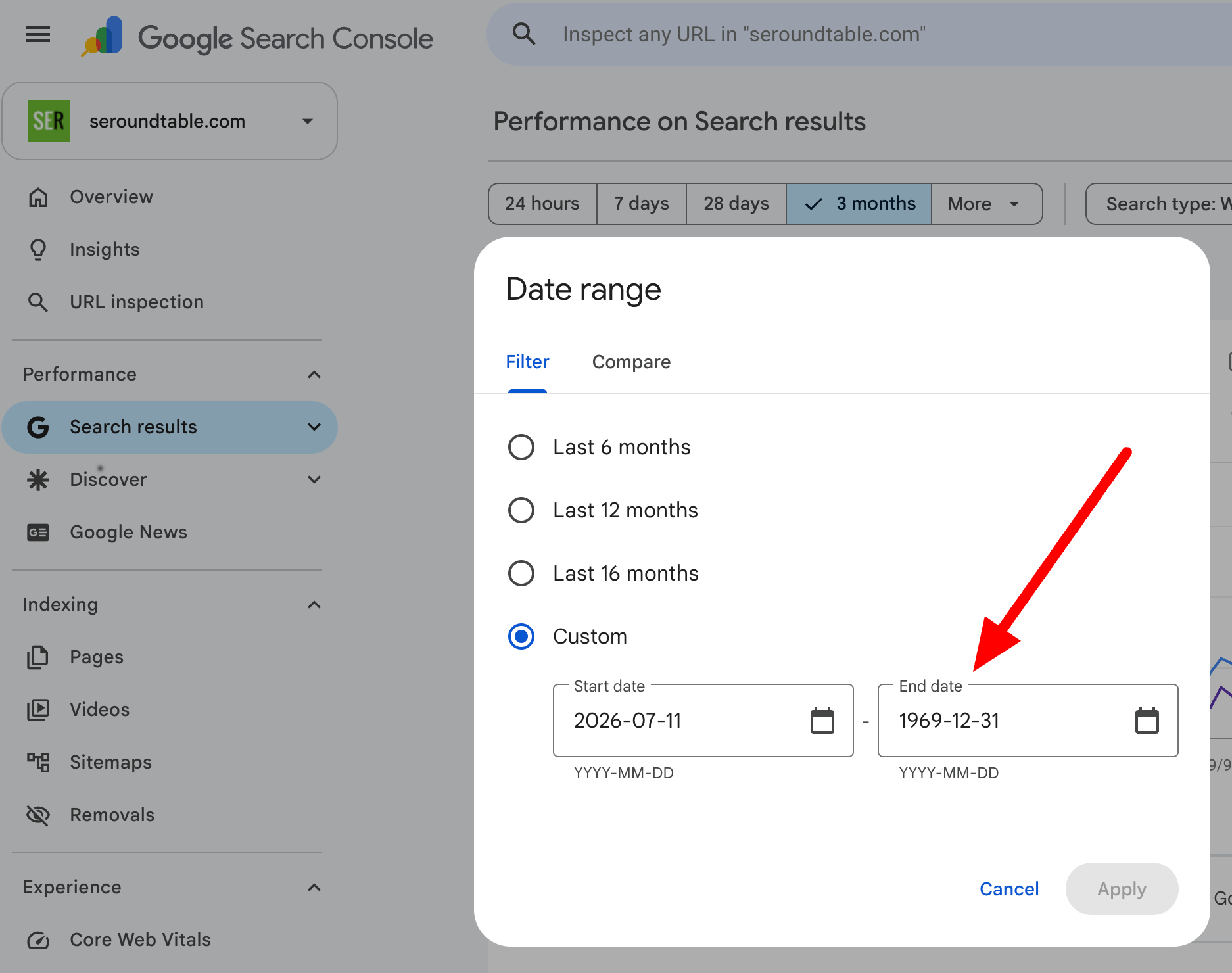
Google Search Console’s date picker is broken, stuck in 1969, making it impossible to analyze custom date ranges for your SEO performance.
Key Highlights
- ✓Date picker stuck in 1969
- ✓Custom date ranges not working
- ✓Presets still functioning normally
- ✓Impact on SEO data analysis
What Happened
For business owners relying on data to drive their marketing decisions, a broken tool can feel like a major roadblock. Recently, a significant UI glitch was reported in Google Search Console (GSC), specifically within the Performance Report. The issue prevents users from selecting a custom end date for their data queries.
Instead of allowing you to choose today, tomorrow, or next month, the date picker defaults to a bizarre date: December 31, 1969. When business owners attempt to manually adjust this date, they are met with an error message stating: "Date can't be after 1969-12-31." This effectively renders the custom date range feature useless for the time being.
Key Details
The issue was first brought to light by industry analyst Punit on X (formerly Twitter) and subsequently reported by Search Engine Roundtable. The bug is specific to the custom date range functionality. Preset options—such as "24 hours," "7 days," "28 days," "3 months," "6 months," "12 months," and "16 months”—continue to function normally.
The error appears to be a frontend rendering issue. Users attempting to click the date picker calendar or type a new date into the field find that the interface does not register their input, leaving the end date stubbornly stuck at the Unix timestamp starting point of 1969. This creates a significant blind spot for anyone trying to analyze trends beyond the standard preset windows.
What It Means For Your Business
While a broken date picker might seem like a minor inconvenience, it can have a tangible impact on how you manage your local business's online visibility. SEO and digital marketing are driven by data. You cannot improve what you cannot measure.
When you cannot select custom date ranges, you lose the ability to perform granular analysis. You might miss out on seeing exactly how a specific marketing campaign performed over a 14-day period or if a sudden spike in traffic occurred over the weekend. This lack of visibility can lead to missed opportunities to double down on what works or pivot away from what isn't working.
For small business owners, who often have limited time and resources, this bug forces them to rely on broader, less precise data sets. This can slow down your ability to react quickly to market changes or algorithm updates that might affect your visibility.
Why It Matters For VisibilityAI
At VisibilityAI, our mission is to help businesses get discovered and cited by AI tools like ChatGPT, Perplexity, and Google AI Overviews. Data integrity is the foundation of this mission.
AI tools rely on accurate, structured data to answer user queries and provide citations. If a business owner cannot access the detailed performance metrics in Google Search Console to optimize their content or fix technical issues, they are less likely to appear in AI search results. Furthermore, the trustworthiness of the data cited by AI is paramount. A system that appears broken or unreliable can undermine the credibility of the business's online presence. Ensuring that your data is accurate and accessible is the first step toward becoming a reliable source that AI tools want to cite.
Workarounds and Next Steps
Currently, Google has not issued a fix or an official statement regarding this bug. However, there are a few workarounds you can use in the meantime:
- Use Preset Ranges: Stick to the preset options like "7 days" or "28 days" to get at least some granular data.
- Check Mobile vs. Desktop: Sometimes, these bugs are device-specific. Try checking your GSC report on a mobile device or a different browser to see if the issue persists.
- Export Data: If you need historical data for a specific period, try exporting the data to a CSV file, though this may not bypass the UI limitation for immediate viewing.
Keep an eye on official updates from Google Search Central for a fix, but in the meantime, don't let a technical glitch slow down your SEO strategy.
Why This Matters For Your Business
For businesses trying to get cited by AI tools, data accuracy is everything. AI models scrape and cite business information based on perceived authority and activity. If your data sources (like Google Search Console) are inaccessible or appear broken, it suggests a lack of maintenance, which can negatively impact how AI tools perceive your business's digital health. Furthermore, without the ability to analyze specific traffic trends, you cannot optimize your content to match user intent, directly reducing your chances of appearing in AI Overviews.
Frequently Asked Questions
Is my SEO data lost due to this bug?
No. Your data is still being collected and stored by Google. The issue is only with the interface that allows you to view and select the timeframes for your reports.
How long will this bug last?
There is no official timeline for a fix yet. It is best to check back periodically or follow updates from the Google Search Central community.
Can I use a different browser to fix this?
Sometimes browser cache issues can cause glitches. Trying a different browser (like Chrome, Firefox, or Edge) or clearing your cache and cookies might resolve the issue if it is a local rendering problem.
Is your business showing up in AI search?
Get your free AI visibility audit - see if ChatGPT, Perplexity, and Google AI actually recommend you.