
Home / News / Google Moves Brand AI Overviews to the Right-Hand Search Column
Google Moves Brand AI Overviews to the Right-Hand Search Column
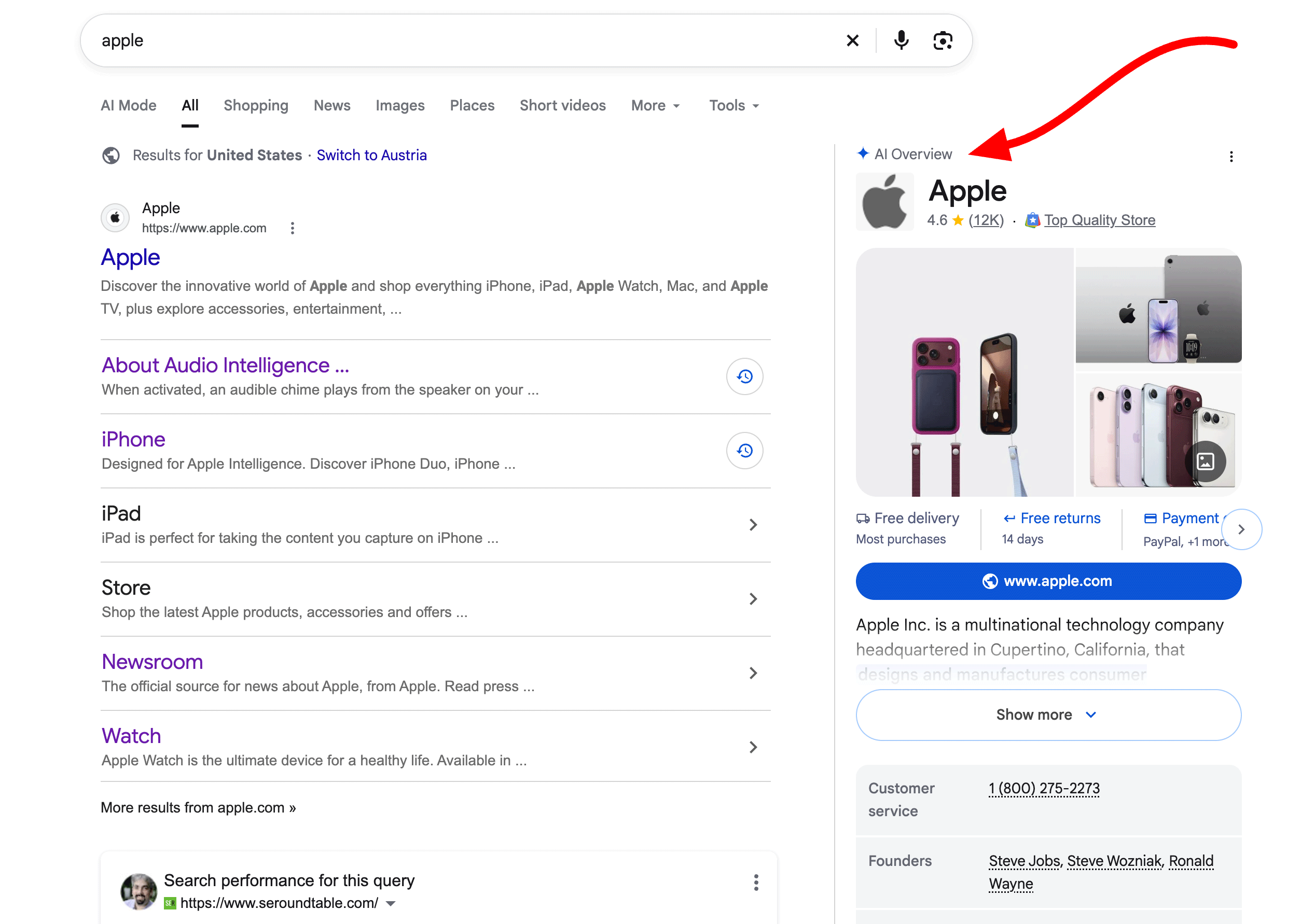
Google is testing a major layout update on desktop search, shifting AI Overviews for brand queries into the right-hand rail where Knowledge Panels used to sit. The change returns the brand's primary website link to the top of the main results column while keeping an AI summary visible alongside it. For business owners, this shift preserves navigational traffic but raises the stakes for managing how AI models describe your company.
Key Highlights
- ✓Google has shifted AI Overviews for brand queries (e.g., Apple, Zillow) to the right-hand desktop column.
- ✓The updated layout replaces or transforms the traditional Knowledge Panel space with dynamic AI-generated text.
- ✓Primary organic website listings regain prominent, unhindered placement at the top of the main search results.
- ✓The change underscores the importance of managing third-party sentiment, as AI Overviews pull diverse sources to describe your brand.
Google is rethinking how it presents brands on desktop search. Rather than dropping an AI Overview straight into the main results feed, the search engine has started shifting these generative summaries into the right-hand column—the exact territory long occupied by the Google Knowledge Panel.
Previously, an AI Overview triggered by a major brand name like "Apple" or "Zillow" would appear directly in the primary center column. That placement often pushed official websites and top organic links down the page. This new test rebalances that dynamic, handing traditional organic listings their prime real estate back while repositioning generative AI as a parallel reference card.
What Happened
Search marketing analyst Chris Long spotted the layout test and shared screenshots on X (formerly Twitter), noting that Google had swapped out standard Knowledge Panels for interactive AI Overviews in the right rail on high-volume brand searches. Industry analyst Barry Schwartz soon corroborated the finding on Search Engine Roundtable.
In this updated layout, standard organic results regain center stage on the left. A searcher immediately sees the company's official homepage, core site links, and primary social channels. Sitting parallel on the right is an AI Overview panel that synthesizes background details, key products, company history, and recent developments, complete with external citation links.
Key Details: The Evolution of Knowledge Panels into AI Real Estate
For over a decade, desktop searchers relied on the right sidebar for quick, factual reference via Google's Knowledge Graph. It pulled static data—founding dates, leadership rosters, stock tickers, and customer service lines—directly from structured resources such as Wikipedia and Wikidata.
The new format replaces that static lookup model with generative synthesis:
- Dynamic Summaries Replace Static Cards: Instead of fixed entity boxes, searchers see running prose generated by Google's Gemini models, pulling context dynamically from across the web.
- Clickable Source Carousel: Rather than presenting facts in isolation, the AI Overview displays link cards pointing to the third-party websites, news outlets, and business profiles behind the summary.
- Restoration of Organic Dominance: Shifting AI text to the side rail ensures a brand's verified domain stays prominently above the fold in the center column, protecting core navigational search traffic.
What It Means For Your Business
Google often tests new SERP treatments on household enterprise names before expanding them to mid-market and local entities. Here is how this layout transition affects your brand strategy:
1. Relief for Branded Click-Through Rates (CTR)
When Google inserted AI Overviews directly above brand listings, companies saw organic click-through rates dip because visitors read the summary box instead of clicking through. Shifting the AI module to the sidebar lets your official homepage reclaim dominant above-the-fold placement, safeguarding your most valuable branded visits.
2. High-Stakes Narrative Control
Desktop users instinctively look to the right-hand column to confirm a company's legitimacy and market standing. Because generative engines pull from customer reviews, news stories, press releases, and forum threads, an inaccurate summary or outdated product description in that sidebar can turn prospects away before they click.
3. The Growing Need for AI Engine Optimization (GEO)
Earning an accurate profile in this right-rail AI box demands tactics that go beyond standard keyword optimization. To help Gemini parse your business cleanly, you need clear structured markup, active third-party review profiles, and authoritative web citations that corroborate what your company actually offers.
Actionable Steps: Preparing for the New Brand Layout
- Audit Your Brand's Digital Footprint: Run searches for your company across Google, Gemini, and Perplexity. Pay close attention to the sources cited in generative answers, whether they come from your About page, local directories, or trade press.
- Leverage Schema Markup: Keep Organization, LocalBusiness, and SameAs structured data up to date across your domain so crawlers have an authoritative, verified baseline of facts.
- Monitor Brand Sentiment Across Third Parties: AI summaries rely heavily on independent commentary and aggregator platforms. Keeping tabs on your Google Business Profile, Trustpilot ratings, and industry-specific discussion boards directly impacts what shows up in your generative brand summary.
Why This Matters For Your Business
This layout test highlights how Google is negotiating the tension between classic search behavior and generative AI. For years, businesses relied on two dependable anchors: a #1 organic ranking and a predictable Knowledge Panel. Moving dynamic AI summaries into that sidebar changes how desktop searchers evaluate a brand's legitimacy and core offerings at a glance. For businesses watching AI search visibility, this update proves that generative discovery is becoming part of standard search navigation rather than a standalone experiment. If an engine gathers outdated pricing, negative commentary, or erroneous company data into that sidebar overview, it can quietly undercut the clicks your primary site would otherwise capture. Ultimately, this shift reinforces the need for Generative Engine Optimization (GEO). Companies cannot afford to manage only their own websites; they must actively monitor how large language models understand and synthesize their broader digital reputation across the web.
Frequently Asked Questions
Why did Google move brand AI Overviews to the right column?
Placing brand AI Overviews in the right column keeps the company's official website link above the fold in the main center feed, reducing friction for navigational searches while still offering users an AI-generated summary alongside the results.
Does this right-column AI Overview replace the traditional Knowledge Panel?
In current desktop tests on major brand queries, the AI Overview takes over the physical space once occupied by the Knowledge Panel, substituting dynamic generative text and source links for static database fields.
How can my business influence the content in a brand AI Overview?
You can shape your AI Overview by deploying clear Organization schema markup, keeping public entity profiles (such as Google Business Profile, Wikidata, and LinkedIn) accurate and synchronized, and proactively managing third-party press and review profiles.
Is your business showing up in AI search?
Get your free AI visibility audit - see if ChatGPT, Perplexity, and Google AI actually recommend you.