
Home / News / Google Maps Pin Bug Places Business Markers in the Ocean – Fix It Now
Google Maps Pin Bug Places Business Markers in the Ocean – Fix It Now
A newly discovered bug in Google Business Profiles is sending map pins for service‑area businesses without public addresses to the middle of the ocean, making them invisible to customers and AI assistants. The article explains who is affected, why it happens, and how to correct the issue to protect local visibility.
Key Highlights
- ✓Service area businesses with hidden addresses are getting misplaced pins.
- ✓The bug appears in the middle of the ocean on Google Maps.
- ✓Customers and AI tools may miss your business if the pin is wrong.
- ✓Fix by updating address visibility and contacting Google support.
What Happened
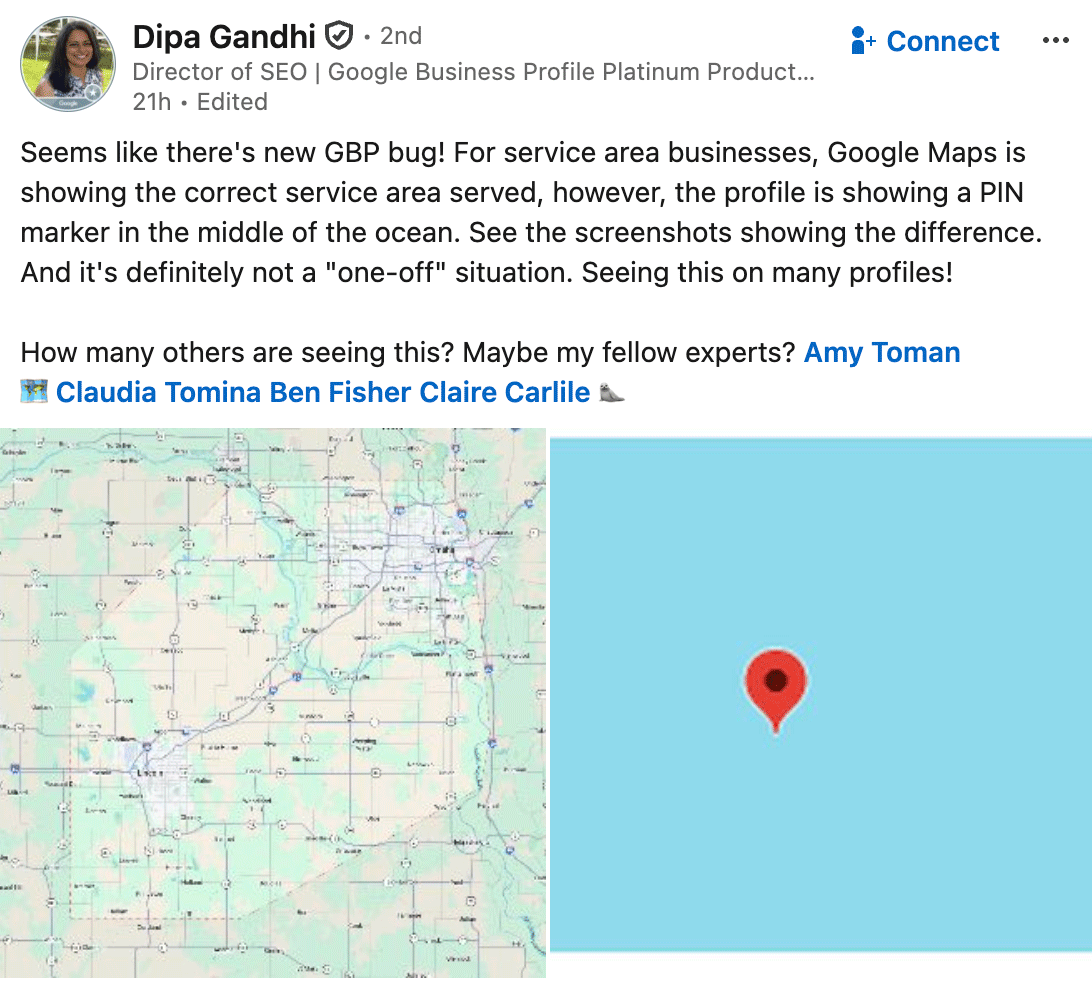
A bug in Google Business Profiles (GBP) is misplacing the map pins for a subset of local businesses. The problem shows up primarily for service‑area businesses that hide their physical address on their Google listing. Instead of placing a marker at the service location, Google Maps drops the pin far offshore—often in the Atlantic or Pacific—leaving both customers and AI‑driven assistants confused.
The issue was first reported by marketing professional Dipa Gandhi on LinkedIn, where she shared screenshots that highlighted the anomaly. Since that post, dozens of owners have confirmed seeing the same ocean‑bound pins on their listings.
Key Details
- Who is affected? Service‑area businesses that conceal their address in GBP.
- What does the pin look like? The standard pin icon appears, but it lands far off‑map, typically in open water.
- Why does it happen? Google’s location algorithm interprets a missing address as “no data” and falls back to a default central coordinate, which ends up in the ocean.
- Is it a one‑off? No. The LinkedIn post and follow‑up comments list multiple listings experiencing the same error.
- Has Google responded? There is no official statement yet, but the problem is being tracked in the Google My Business support forum.
What It Means For Your Business
1. Customers Won’t Find You
When a prospect searches for your business name or a relevant service, the result may display a pin miles away from your actual location. A pin stuck in the ocean prevents users from getting directions, calling you, or even confirming that you exist.
2. AI Assistants Miss You
Voice assistants and chatbots such as ChatGPT, Gemini, and Perplexity pull location data from Google’s map APIs. A misplaced pin means these tools will omit your business from their answers, effectively removing you from AI‑driven discovery.
3. Lost Local Traffic & Conversions
Local SEO hinges on appearing in the “3‑pack” and on the map. A missing or inaccurate pin can push you out of that pack, decreasing click‑throughs, phone calls, and foot traffic. Even a well‑ranked website can suffer if the map marker looks wrong, because users may doubt the business’s legitimacy.
4. How to Fix It
- Verify your address – Temporarily add a valid street address to your GBP so Google has a concrete anchor point.
- Re‑enter your service area – Double‑check the radius and ensure the address field is populated.
- Contact Google Support – Use the “Report a problem” link in the Google My Business dashboard and describe the ocean‑pin symptom.
- Monitor the listing – After making changes, revisit the map within 24–48 hours to confirm the pin has moved to the correct spot.
- Keep information current – Schedule regular audits of your GBP to catch future glitches early.
By following these steps you can restore your visibility on Google Maps and in AI‑powered searches, ensuring customers locate you exactly where you operate.
---
Bottom line: What looks like a minor UI glitch can cripple local discovery. Promptly correct your GBP details and keep an eye on the pin’s placement to stay ahead of the curve.
Why This Matters For Your Business
Accurate map data is the foundation of local discovery. When a business’s pin lands in the ocean, shoppers searching for nearby services are presented with an irrelevant location, which creates confusion and drives potential customers straight to competitors. AI assistants—including ChatGPT, Gemini, and Perplexity—rely on Google’s map APIs to answer location‑based queries. A misplaced pin removes your business from those answers, effectively silencing you in the emerging AI‑driven search ecosystem. Beyond lost traffic, a floating pin can erode trust; prospects may question the legitimacy of a company that cannot be found on a map, harming conversion rates and brand reputation.
Frequently Asked Questions
What is causing the Google Maps pin bug?
A recent bug in Google Business Profiles misinterprets service‑area listings that hide their physical address, causing the map marker to default to a generic coordinate that ends up in the ocean.
Does this affect all businesses?
Only service‑area businesses that conceal their address in Google Business Profiles are affected; listings with visible addresses continue to display correctly.
What steps can I take to fix the issue?
Temporarily add a valid address, verify and re‑enter your service‑area details, and use the “Report a problem” link in the Google My Business dashboard to alert Google support.
Is your business showing up in AI search?
Get your free AI visibility audit - see if ChatGPT, Perplexity, and Google AI actually recommend you.