
Home / News / Google Maps Bug Sends Business Pins to Ocean – What to Do Now
Google Maps Bug Sends Business Pins to Ocean – What to Do Now
A new Google Maps bug is placing pins for service‑area businesses in the ocean, jeopardizing local visibility and AI‑driven citations. The issue affects businesses that hide their street address, and it can confuse AI assistants that rely on Google Maps data. Quick verification, reporting, and the right tools can keep your listing anchored on land.
Key Highlights
- ✓Google Maps bug places service‑area pins in the ocean
- ✓AI search tools may ignore or misrepresent affected businesses
- ✓Immediate fixes include GBP edits and bug reporting
- ✓VisibilityAI offers automated audits to safeguard AI citations
What Happened
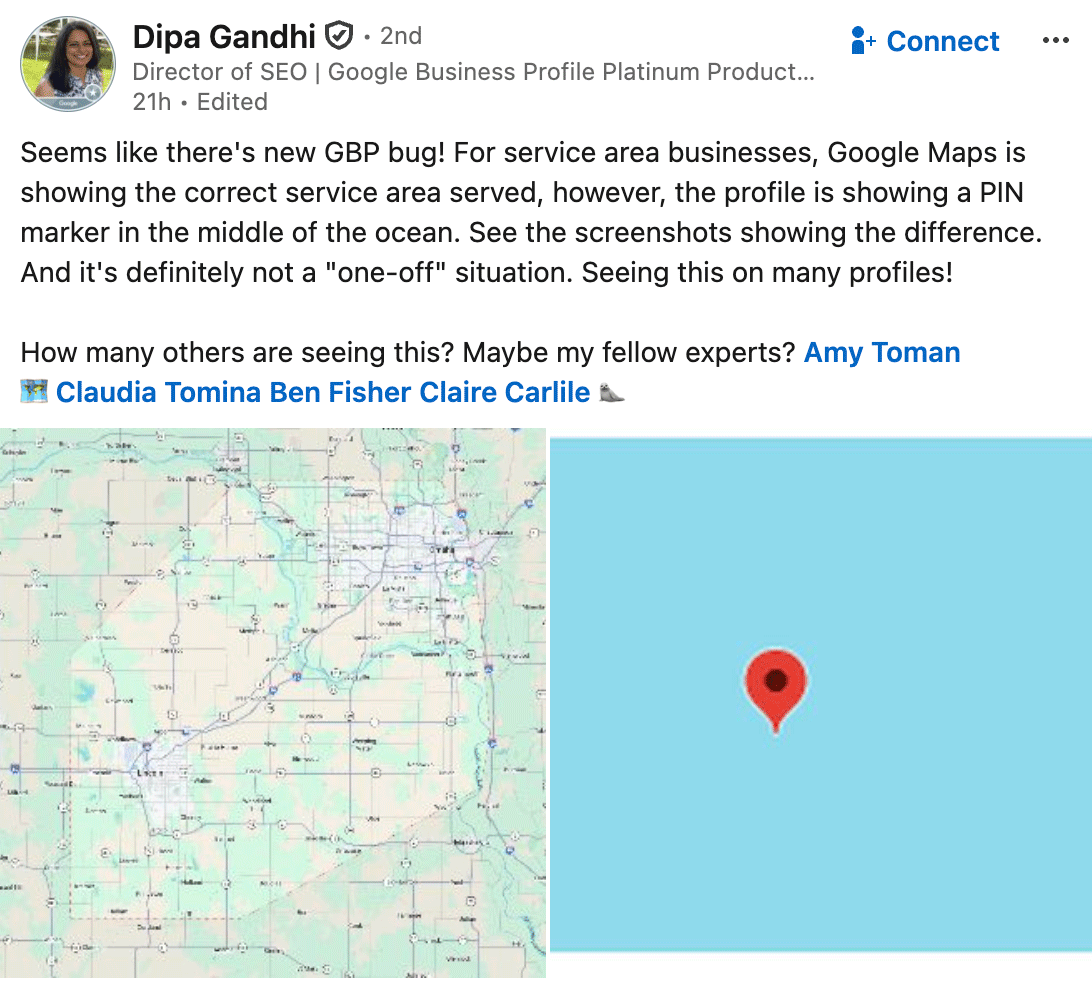
A new bug in Google Business Profiles (GBP) and Google Maps is misplacing the map pin for some service‑area businesses in the middle of the ocean. The issue appears when a business chooses not to display a street address on its public listing—a common practice for plumbers, lawn‑care companies, and other mobile services. Instead of placing the pin within the defined service radius, Google Maps defaults to a coordinate that lands far offshore.
The glitch was first reported by Dipa Gandhi on LinkedIn, where she shared side‑by‑side screenshots that compare the expected pin location with the erroneous ocean placement. Within hours, other owners confirmed the same pattern, indicating that this is a systemic problem affecting multiple profiles.
Key Details
- Who is affected? Service‑area businesses that hide their physical address in GBP. The bug spans industries from home‑repair to delivery services.
- What customers see: The service‑area polygon remains correct, but a solitary pin floats in the water, often far from any landmass.
- Why it matters now: AI‑driven tools such as ChatGPT, Perplexity, Gemini, and Google AI Overviews pull location data from Google Maps to generate local recommendations. A misplaced pin can confuse these models, resulting in inaccurate citations.
- Is it a one‑off? No. Multiple profiles have reported the same behavior, pointing to a broader data‑processing issue in Google’s location engine.
- Current status: Google has not issued an official statement. The community continues to monitor the situation while sharing work‑arounds.
What It Means For Your Business
Visibility at Risk
AI assistants that reference Google Maps data often use the pin location to verify a business’s existence. When the pin sits in the ocean, the AI may flag the listing as invalid or ignore it altogether, reducing the likelihood of appearing in AI‑generated answers or voice‑search results.
Impact on Local SEO Rankings
Google’s ranking algorithms weigh map accuracy. A stray pin can signal low‑quality data, potentially lowering your position in the local pack even though the service‑area polygon is correct. Both users and search engines may view the listing with suspicion.
Reputation Concerns
Prospects who click the map link might wonder why the pin is in the middle of the Pacific and assume the business is a scam. This confusion can increase bounce rates, depress click‑through rates, and ultimately hurt conversion metrics.
Immediate Actions
1. Verify your GBP settings – Log into Google Business Profile and ensure the address field is either fully populated or deliberately hidden using the “service area only” option.
2. Force a map refresh – Slightly edit the service area (add a zip code or adjust the radius) and save. This often triggers Google to recompute the pin location.
3. Report the bug – Click “Suggest an edit” on the map and describe the issue. The more reports Google receives, the quicker a fix is likely to be prioritized.
4. Add structured data – Implement local‑business schema on your website with accurate latitude/longitude coordinates to give search engines an additional source of truth.
5. Monitor AI citations – Use tools like VisibilityAI, ChatGPT plugins, or Perplexity to see how your business is being referenced. If the ocean pin appears, request a correction through the platform’s feedback channel.
Long‑Term Strategies
- Maintain a public address where possible. A virtual office or coworking space address can serve as a stable anchor for the pin.
- Leverage third‑party directories (Yelp, Bing Places, Apple Maps) to diversify your location signals. AI models often cross‑reference multiple sources.
- Stay informed – Follow Google’s Local Guides blog and community forums for updates on the bug’s resolution.
How VisibilityAI Can Help
VisibilityAI specializes in keeping local businesses accurately cited across AI platforms. Our services include:
- Automated map audits that flag misplaced pins before they affect AI citations.
- Schema implementation that reinforces precise location data.
- AI‑ready citation management to maintain a consistent business profile on ChatGPT, Gemini, and other large language models.
By continuously monitoring your GBP and feeding clean data into AI systems, you protect your brand’s discoverability and retain a competitive edge in an AI‑first search landscape.
---
Bottom line: The ocean‑pin bug is more than a quirky visual error—it threatens the core of local discovery in an era where AI assistants serve as the primary gateway to businesses. Verify your listing, report the issue, and consider tools like VisibilityAI to keep your digital footprint anchored on solid ground.
Why This Matters For Your Business
In the AI‑driven search era, local businesses no longer rely solely on traditional Google rankings. Large language models such as ChatGPT, Perplexity, and Gemini extract structured data from Google Maps to answer user queries, generate travel guides, and suggest service providers. When a business’s pin lands in the ocean, those models receive contradictory signals—the service‑area polygon says the business operates locally, but the coordinate points to a remote location. This mismatch can cause the AI to skip the listing entirely or present it as an error, dramatically reducing the chances that a potential customer discovers the business through voice assistants or AI‑generated recommendations. For marketers, the stakes are high. A misplaced pin not only hurts click‑through rates on the map itself but also erodes trust in the brand. Customers who see a pin floating in the Pacific Ocean may assume the business is fraudulent, leading to higher bounce rates and lower conversion. Moreover, local SEO rankings are partially driven by map accuracy; a faulty pin can signal low data quality to Google’s algorithm, potentially pushing the business down in the local pack. Promptly correcting the pin and ensuring consistent location data across all platforms helps preserve visibility, credibility, and competitive advantage in an environment where AI is increasingly the first point of contact.
Frequently Asked Questions
Why does my Google Business Profile pin appear in the ocean?
The bug primarily affects service‑area businesses that hide their physical address. When Google’s location engine cannot assign a street address, it defaults the pin to a set of coordinates that fall offshore.
Will fixing the pin improve my AI search rankings?
Yes. Accurate map data feeds the AI models that power ChatGPT, Gemini, and similar tools. Correcting the pin ensures your business is cited correctly and can lift local SEO performance.
How can VisibilityAI help prevent this issue?
VisibilityAI runs automated map audits, implements precise schema, and continuously monitors AI citations, keeping your location data accurate across all AI platforms.
Is your business showing up in AI search?
Get your free AI visibility audit - see if ChatGPT, Perplexity, and Google AI actually recommend you.