
Home / News / Google Local Service Ads Bug Shows Wrong Locations – What to Do
Google Local Service Ads Bug Shows Wrong Locations – What to Do
A newly discovered bug in Google Local Service Ads is causing ads to appear for locations outside the service area that advertisers have specified. The mismatch wastes ad spend, confuses customers, and can mislead AI‑driven search tools that rely on Google’s local listings.
Key Highlights
- ✓Google LSA bug shows ads outside targeted service areas
- ✓Potential waste of ad spend and loss of qualified leads
- ✓Incorrect location data can mislead AI search assistants
- ✓Immediate steps: audit listings, monitor leads, and diversify channels
What Happened
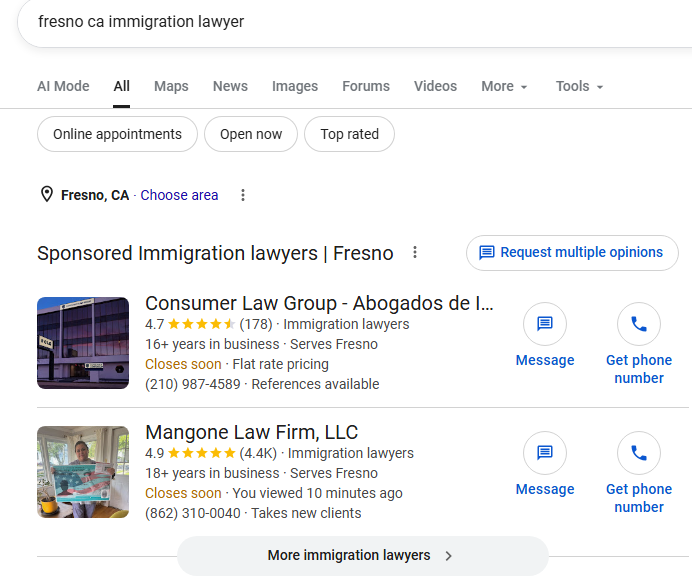
Earlier this week, Search Engine Roundtable reported a glitch in Google’s Local Service Ads (LSA) platform. Advertisers who have carefully defined a service area—city, ZIP code, or radius—are suddenly seeing their ads appear for queries outside those zones. In some instances, users encounter ads from businesses that don’t serve their location at all. The problem appears to be a backend bug that disregards the geographic targeting parameters LSAs are designed to honor.
Key Details
- Platform: Google Local Service Ads (LSA) – the pay‑per‑lead system that displays the "Google Guaranteed" badge for local service providers such as plumbers, electricians, and HVAC contractors.
- Bug Behavior: Ads are being served to users in locations not listed in the advertiser’s service area.
- Impact Scope: Early reports indicate the issue affects a subset of advertisers across multiple industries, though Google has not released exact numbers.
- Google’s Response: At the time of writing, Google has acknowledged the problem and is working on a fix, but no ETA has been provided.
- Why It Matters: LSAs attract high‑intent traffic. When an irrelevant ad appears, it wastes budget and erodes trust with customers who rely on AI‑driven search results.
What It Means For Your Business
1. **Budget Drain**
If your LSA budget is $1,000 a month and 20% of those leads originate from the bug‑affected regions, you could be spending $200 on leads that will never convert. Redirecting that spend to truly local campaigns—or to AI‑friendly platforms like ChatGPT, Perplexity, and Gemini—offers a better return.
2. **Brand Reputation Risk**
Picture a homeowner in Austin, TX, seeing an ad for a plumbing service that only operates in Denver, CO. The mismatch can generate negative reviews, complaints, and lasting damage to brand perception, especially when AI assistants cite that business in their answers.
3. **AI Search Citations**
VisibilityAI helps small businesses appear in AI‑generated results. When AI models scrape “best plumbers near me,” they often pull data from Google’s local listings. Polluted listings with incorrect service‑area data can cause AI to recommend the wrong provider, undermining your competitive edge.
4. **Opportunity to Audit Your Listings**
Treat this glitch as a prompt to audit every local listing—Google Business Profile, Yelp, Bing Places, and niche directories. Consistency across platforms helps AI tools correctly interpret where you operate.
Actionable Steps for Marketers
- Monitor Lead Quality: Add UTM parameters and capture the ZIP code of each inbound lead. Flag any that fall outside your declared service area.
- Pause Underperforming Ads: If you notice a surge in irrelevant clicks, temporarily pause the affected campaigns while Google resolves the bug.
- Contact Google Support: Open a support ticket referencing the SERoundtable article and attach screenshots of the mismatched ads.
- Leverage Alternative Channels: Strengthen your presence on AI‑friendly platforms (VisibilityAI, Bing AI, etc.) to diversify traffic sources.
- Update Structured Data: Verify that your website’s schema markup (
LocalBusiness,serviceArea) reflects the correct geography. Accurate schema guides AI assistants to the right information.
Key Takeaways
- Bug Impact: Wrong‑location ads can drain budget and harm brand trust.
- AI Relevance: Inaccurate local data can mislead AI search tools that cite businesses.
- Proactive Audits: Consistency across all local listings is essential.
- Diversify: Don’t rely solely on LSAs; combine SEO, paid search, and AI‑focused citation services.
FAQs
- Q: How can I tell if my LSA is affected?
A: Review the “Leads” report in your LSA dashboard for ZIP codes outside your service area. You can also perform manual searches (e.g., “plumber near Seattle”) and note which ads appear.
- Q: Will this bug affect my organic rankings?
A: Directly, no. However, if AI tools pull incorrect local data, it could indirectly influence click‑through rates and brand perception, which in turn affect rankings.
- Q: Should I stop using LSAs until Google fixes the bug?
A: Not necessarily. Reduce or pause budgets for the most affected locations, but keep campaigns active in verified service areas to maintain visibility.
Why This Matters For Your Business
For local businesses, Google Local Service Ads serve as a high‑intent gateway to customers who are ready to hire. When a bug sends ads to the wrong locations, it not only drains precious marketing dollars but also sends mixed signals to AI‑driven search tools that rely on Google’s data to generate answers. An AI assistant that recommends a plumber in Denver to a homeowner in Austin creates a frustrating experience and can drive the user to a competitor. VisibilityAI’s mission is to ensure small businesses are cited accurately by these AI tools. Clean, consistent, and correct local data across Google Business Profiles, LSAs, and other directories forms the foundation of that strategy. By addressing the LSA bug now—through diligent monitoring, pausing mis‑targeted ads, and reinforcing structured data—business owners can protect their ad spend, preserve brand trust, and keep AI assistants pointing the right traffic to their doors.
Frequently Asked Questions
How can I verify if my Local Service Ads are showing in the wrong locations?
Review the ‘Leads’ report in your LSA dashboard for ZIP codes that fall outside your declared service area. You can also perform manual searches (e.g., “electrician near [city]”) and note which ads appear.
Will this bug affect my organic search rankings?
The bug itself does not change your organic rankings, but inaccurate local data can confuse AI search tools, potentially reducing click‑through rates and brand credibility, which indirectly impacts SEO.
Should I pause all Local Service Ads until Google fixes the issue?
Pause or reduce budgets for campaigns targeting the affected locations, but keep ads active in verified service areas to maintain visibility while the bug is being resolved.
Is your business showing up in AI search?
Get your free AI visibility audit - see if ChatGPT, Perplexity, and Google AI actually recommend you.