
Home / News / Google Business Profiles: Verify with Government ID – Local SEO Impact
Google Business Profiles: Verify with Government ID – Local SEO Impact
Google has rolled out a new verification method for Business Profiles that allows owners to upload a photo of their government-issued ID. This streamlined process not only speeds up the setup but also strengthens trust and protects your local presence against fraud.
Key Highlights
- ✓New ID‑based verification option for Google Business Profiles
- ✓Immediate verification, often within minutes
- ✓ID used only for verification, not displayed publicly
- ✓Helps improve trust and AI search accuracy
What Happened
Google announced a new verification method for its Business Profiles that lets owners submit a photo of their government-issued ID. This feature is part of a broader effort to improve authenticity and reduce spam on local listings. The news broke after a community member tipped off the Local Search Forum and was subsequently reported by Search Engine Roundtable.
Key Details
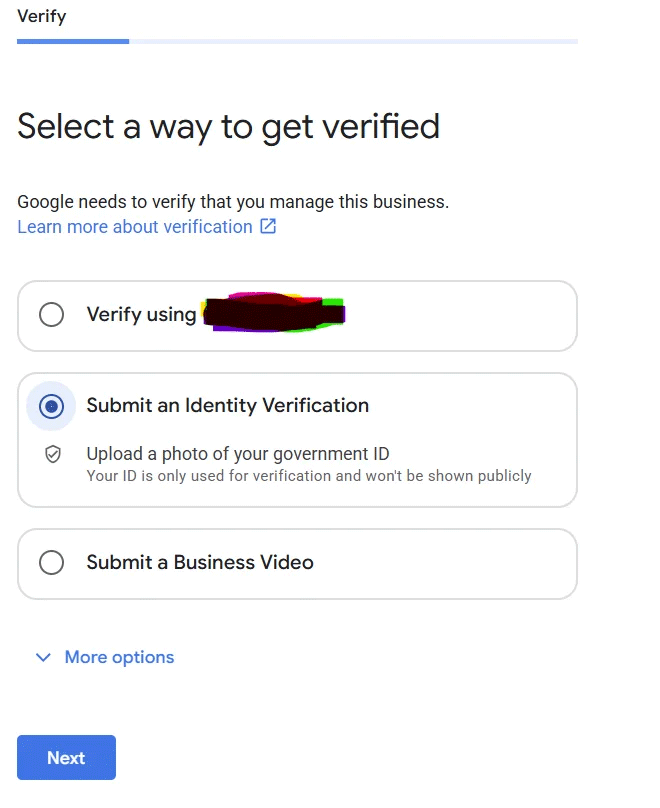
- How it works: When you visit the verification section of your Business Profile, an option labeled Submit an Identity Verification appears. You simply upload a clear image of a valid government ID, such as a passport, driver’s license, or national ID card.
- Privacy assurance: Google explicitly states that the photo is used solely for verification and will never be displayed publicly.
- Additional safeguards: The system cross-checks the ID details against the business address and contact information already on file.
- Availability: Currently, this is a testing feature available only in a handful of countries and to a limited set of verified accounts.
- Complementary methods: This option adds to the existing verification methods, including phone calls, text messages, email, live video calls, and physical mail.
What It Means For Your Business
1. Faster Verification
Traditional phone or mail verification can take days to complete. Uploading a government ID often finishes the process in minutes, allowing you to get your profile live and start attracting customers sooner.
2. Increased Credibility
An ID that matches your business name and address signals to both Google and potential customers that you are a legitimate operator. This can boost your trust scores and improve your rankings in the local pack.
3. Better AI Search Visibility
Tools like ChatGPT, Perplexity, Gemini, and Google AI rely heavily on accurate business data. A verified ID reduces the risk of data discrepancies, ensuring that AI tools present the correct name, address, and phone number (NAP) when answering user queries.
4. Protection Against Fraud
Having a government ID on file makes it significantly harder for imposters to claim or hijack your listing. This added layer of security helps protect your brand reputation from being compromised.
5. Compliance with Emerging Standards
Search engines are increasingly moving toward stricter identity verification. Early adoption positions you ahead of competitors who may still be relying on less secure methods.
Bottom Line
If you’re a local or small business looking to dominate the AI-driven search landscape, consider adding the government-ID verification to your profile. It’s a quick step that can pay off in visibility, trust, and speed.
Key Highlights
- New ID-based verification option for Google Business Profiles
- Immediate verification, often within minutes
- ID used only for verification, not displayed publicly
- Helps improve trust and AI search accuracy
Why It Matters
Local businesses rely heavily on accurate and trustworthy information to attract customers. When a business profile is verified with a government ID, Google signals to its algorithms that the listing is authentic. This credibility boost can elevate your ranking in the local pack, especially as AI assistants increasingly pull from verified data sets.
The speed of verification is a game-changer. Traditional methods can delay your presence on the map and in search results, costing you missed foot traffic and calls. The instant nature of ID upload means you can react quickly to seasonal trends, promotions, or new services, keeping your profile fresh and relevant.
Security is paramount. As data breaches become more common, having a government-ID verification adds a layer of protection against impersonation. This safeguards your brand reputation and builds confidence among customers who increasingly demand trustworthy business interactions.
FAQs
- Q: Is my government ID safe with Google?
A: Google confirms that the ID is used only for verification purposes and is not displayed publicly or shared with third parties.
- Q: Which IDs are accepted?
A: Valid passports, driver’s licenses, or national ID cards from your country are accepted, provided they are current and readable.
- Q: Can I use this method in any country?
A: Currently the feature is in testing and available only in selected regions. Check the verification section of your profile for availability in your location.
Why This Matters For Your Business
Local businesses rely heavily on accurate and trustworthy information to attract customers. When a business profile is verified with a government ID, Google signals to its algorithms that the listing is authentic. This credibility boost can elevate your ranking in the local pack, especially as AI assistants increasingly pull from verified data sets. The speed of verification is a game-changer. Traditional methods can delay your presence on the map and in search results, costing you missed foot traffic and calls. The instant nature of ID upload means you can react quickly to seasonal trends, promotions, or new services, keeping your profile fresh and relevant. Security is paramount. As data breaches become more common, having a government-ID verification adds a layer of protection against impersonation. This safeguards your brand reputation and builds confidence among customers who increasingly demand trustworthy business interactions.
Frequently Asked Questions
Is my government ID safe with Google?
Google confirms that the ID is used only for verification purposes and is not displayed publicly or shared with third parties.
Which IDs are accepted?
Valid passports, driver’s licenses, or national ID cards from your country are accepted, provided they are current and readable.
Can I use this method in any country?
Currently the feature is in testing and available only in selected regions. Check the verification section of your profile for availability in your location.
Is your business showing up in AI search?
Get your free AI visibility audit - see if ChatGPT, Perplexity, and Google AI actually recommend you.