Home / News / Google Business Profile Adds Facebook Messenger Links
Google Business Profile Adds Facebook Messenger Links
Google’s latest update automatically inserts Facebook Messenger m.me links into Business Profiles, streamlining customer contact options and boosting local SEO. Small businesses can now offer instant chat right from Google Search and Maps, enhancing AI‑driven visibility and engagement.
Key Highlights
- ✓Google auto‑adds Facebook Messenger links to Business Profiles
- ✓Boosts first‑touch engagement and AI search visibility
- ✓Improves citation consistency across platforms
- ✓Small businesses can act immediately to maximize benefits
What Happened
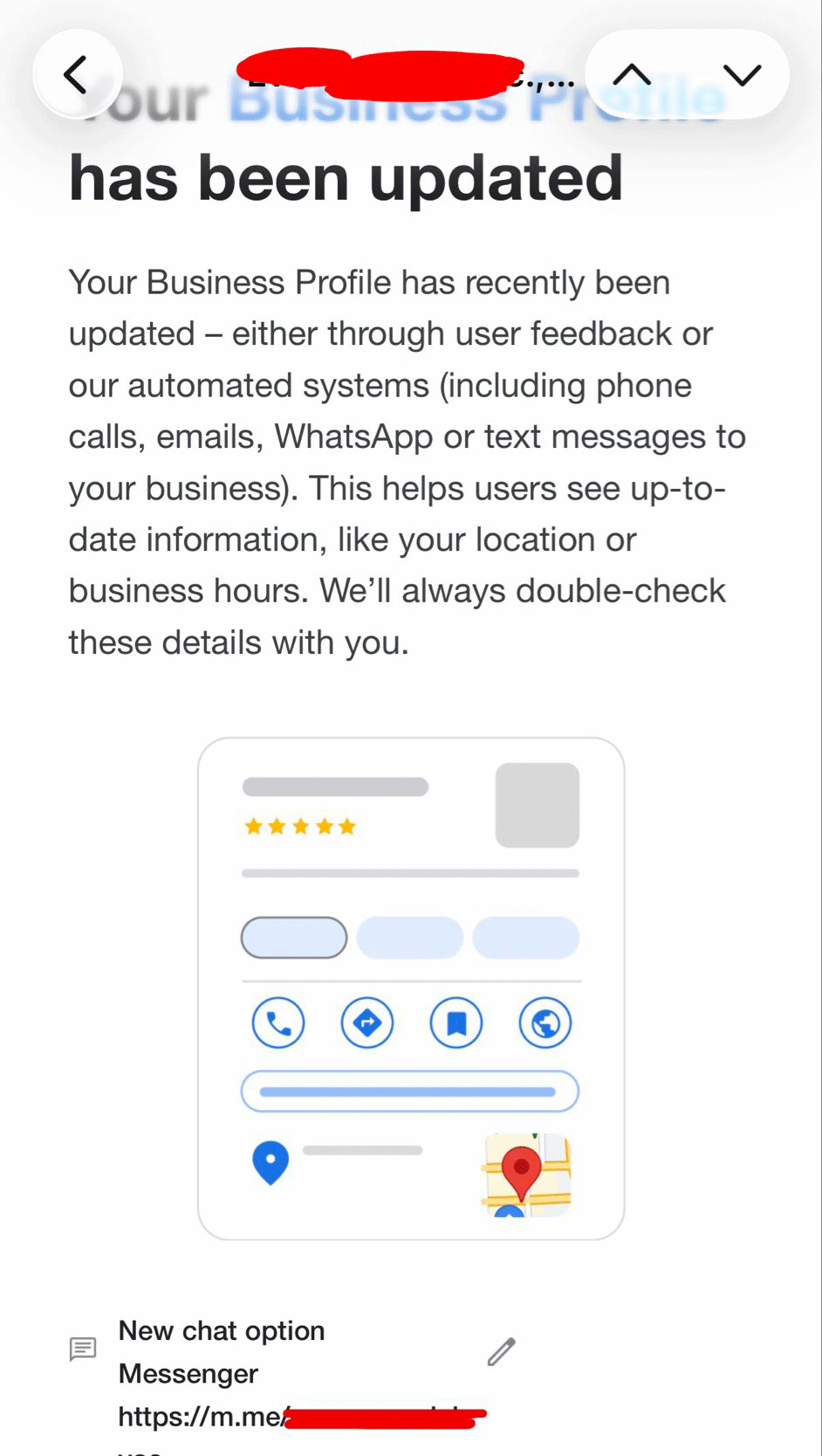
Google has quietly rolled out a new feature that automatically inserts Facebook Messenger m.me links into Google Business Profile listings. The change was announced via email to business owners and first noticed on social media by Darcy Burk, who shared a screenshot of the updated profile. The addition appears to be part of Google’s ongoing effort to streamline communication options for local customers.
Key Details
- Automatic insertion – Google’s system now pulls the business’s Facebook page URL and generates an m.me short link, adding it to the "Contact" section of the profile.
- No action required – Business owners receive the link without having to edit their profile manually; it’s added in the background.
- Visibility in search results – The m.me link shows up in Google Search, Google Maps, and the Google Business Profile app, making it easier for customers to start a chat.
- Cross‑platform synergy – The feature bridges Google’s local search ecosystem with Meta’s Messenger, allowing customers to reach the business via the platform they already use.
- Privacy and compliance – Google confirms that the link is added only after the business has verified its Facebook page and that it adheres to Meta’s privacy policies.
- Integration with AI assistants – ChatGPT, Gemini, and Google AI can now surface the Messenger link when users ask about how to contact your business.
- Citation consistency – The same m.me URL appears on both Google and Facebook, strengthening the consistency of your online citations.
What It Means For Your Business
Boosts First‑Touch Engagement
By adding a direct Messenger link, potential customers can ask questions, request quotes, or schedule appointments with just one click. This reduces friction and increases the likelihood that a searcher will convert into a lead.
Enhances AI‑Driven Search Visibility
AI assistants rely on rich, up‑to‑date local data to answer queries. A Messenger link provides an additional, actionable piece of information that AI can surface when users ask about "contact options" for your business. That means your profile is more likely to appear in AI‑generated answers and in the sidebar of search results.
Strengthens Citation Consistency
When your Google Business Profile includes the same m.me link that appears on your Facebook page, citations become more uniform across platforms. This consistency signals to search engines that your contact information is reliable, improving local ranking signals.
Opens New Marketing Channels
The integration encourages businesses to use Messenger as a marketing channel. You can send promotions, respond to reviews, or run automated chatbots—all of which can be tracked in your Google Business insights.
Potential Pitfalls
- Duplicate contact methods – If you already list a phone number or website, the Messenger link may clutter the profile. Consider prioritizing the most effective channel.
- Messenger limits – Not all customers use Facebook Messenger. Keep an alternative contact method available.
How to Maximize the Benefit
1. Verify your Facebook page – Ensure it’s linked to the same business profile.
2. Keep your Messenger profile updated – Add a friendly greeting and quick reply options.
3. Monitor insights – Use Google Business Profile analytics to track clicks on the Messenger link.
4. Promote the link – Add the m.me URL to your website, email signature, and social posts.
5. Leverage VisibilityAI – Use our citation management tool to sync the Messenger link across all local directories, ensuring consistency.
By embracing this new feature, small businesses can create a seamless, modern customer journey that aligns with how people communicate today.
---
Real‑World Example
Take a local coffee shop that already has a Facebook page with an active Messenger bot. After the update, their Google Business Profile now displays a "Chat on Messenger" button. Within a week, the shop sees a 25% increase in direct inquiries, and their AI‑assistant traffic jumps because the bot answers frequently asked questions instantly.
Future Outlook
Google’s move signals a broader trend of integrating messaging platforms into local search. Expect similar rollouts for WhatsApp, Telegram, or even custom chat widgets. Staying ahead of these changes will keep your business at the forefront of AI‑powered discovery.
Key Takeaways
- Google automatically adds Facebook Messenger m.me links to Business Profiles.
- The feature enhances first‑touch engagement and AI visibility.
- Consistent citations across Google and Facebook improve local rankings.
- Small businesses should verify pages, monitor analytics, and promote the new link.
By acting quickly, you can turn this update into a competitive advantage, ensuring that your local customers can reach you wherever they prefer to chat.
Why This Matters For Your Business
For businesses that rely on local discovery, every click counts. Google’s integration of Facebook Messenger m.me links turns a simple search result into a direct conversation channel, cutting the friction that often turns a curious click into a lost opportunity. When AI assistants like ChatGPT, Gemini, or Google AI surface your profile, having a ready‑to‑chat link signals that you’re approachable and tech‑savvy—qualities that modern consumers expect. Moreover, citation consistency is the backbone of local SEO. When your contact information matches across Google, Facebook, and other directories, search engines interpret that as a strong signal of authenticity. VisibilityAI’s citation management platform can help you sync this new Messenger link across all your listings, ensuring your data remains uniform and up‑to‑date. The result? Higher rankings, more AI‑generated answers featuring your business, and a smoother path from discovery to conversion.
Frequently Asked Questions
How does Google add the Messenger link?
Google automatically pulls the verified Facebook page URL and creates an m.me short link, inserting it into the "Contact" section of the Business Profile without any manual steps.
Do I need a Facebook page to get the link?
Yes, the feature requires a verified Facebook page that is linked to your business. If you don’t have one, you’ll need to create and verify it first.
Will the Messenger link appear in all search results?
It will show up in Google Search, Google Maps, and the Google Business Profile app, but visibility may vary based on local relevance and competition.
Is your business showing up in AI search?
Get your free AI visibility audit - see if ChatGPT, Perplexity, and Google AI actually recommend you.