
Home / News / Google Boosts Links in AI Mode & Overviews—What Small Biz Must Know
Google Boosts Links in AI Mode & Overviews—What Small Biz Must Know
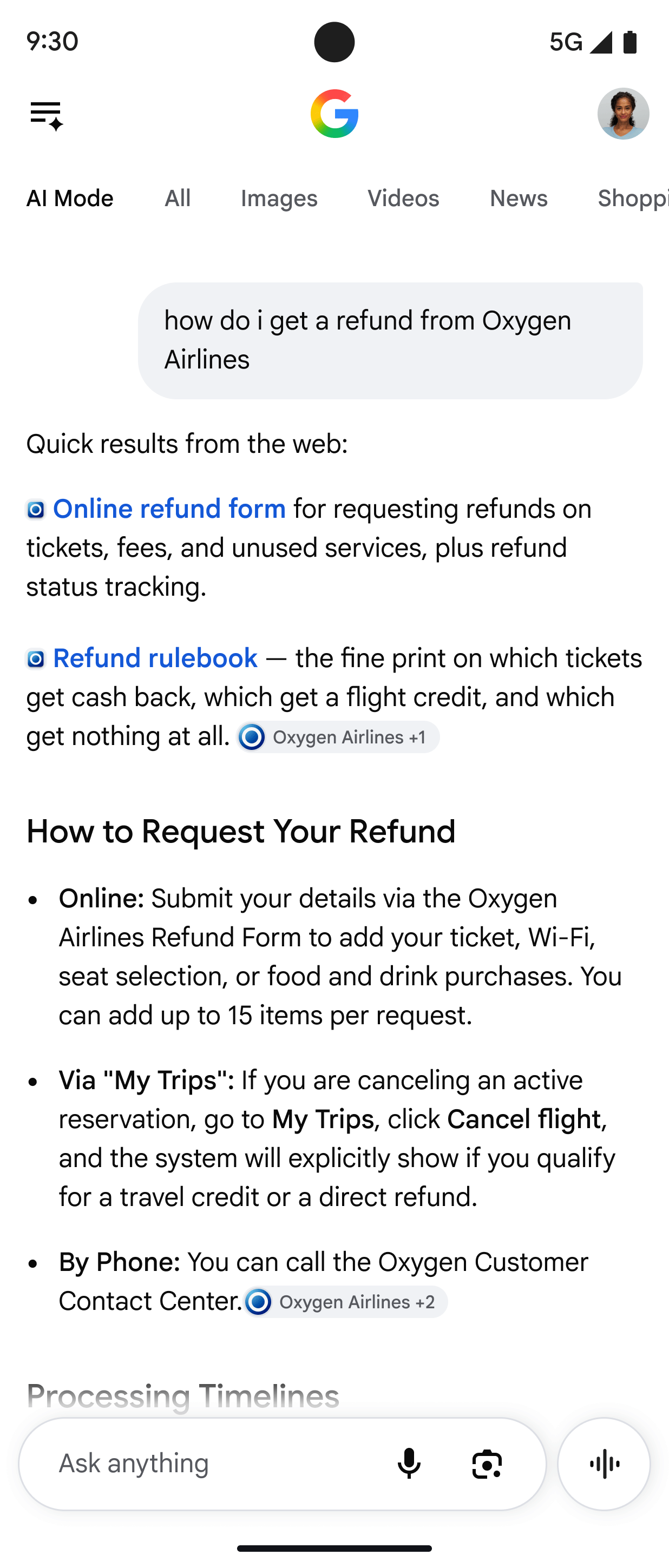
Google has rolled out fresh tweaks to AI Mode and AI Overviews, adding more links, moving them higher in the response, expanding article carousels, and stopping click‑through data from being shown. Small businesses need to understand these changes to keep their content visible in the new AI‑driven search landscape.
Key Highlights
- ✓Google adds more links and moves them higher in AI responses
- ✓Single “right‑web‑page” links may appear for highly specific queries
- ✓Timely article carousels expand to more regions and languages
- ✓Click‑through data will no longer be displayed in the AI UI
What Happened
On October 15, 2026, Google announced another round of updates to the way it surfaces links in AI Mode and AI Overviews. While the company frames the changes as a push to drive more clicks from AI‑generated answers back to the original publishers, the real impact is broader: the search experience is becoming more link‑rich and less transparent about click performance.
Key points from the announcement include:
- More links are now displayed in AI responses, with some placed higher up the answer.
- For certain queries, Google will surface one or two “right‑web‑page” links that it deems the most relevant.
- Timely article carousels are being expanded to additional regions and languages.
- Related‑article link designs are now more prominent, making them easier to spot.
- Google is testing linking to Search profiles (author or brand pages) directly from AI answers.
- Click‑through data will no longer be shown in the UI, meaning publishers won’t see how many users clicked a link from an AI response.
These adjustments are part of Google’s ongoing effort to blend traditional search results with generative AI answers, a trend that’s reshaping how users discover information online.
---
Key Details
| Update | What It Looks Like | Why It Matters |
|--------|-------------------|----------------|
| Increased link count | AI answers now include a longer list of source links, often appearing as a vertical stack beneath the generated text. | More opportunities for your page to be featured, but also more competition for attention. |
| Higher‑placement links | The most relevant link may appear directly after the first paragraph, before the usual “Read more” carousel. | Early‑positioned links attract more clicks, boosting traffic potential. |
| “Right web page” links | For query‑specific intents, Google may show a single, highly‑targeted link (e.g., a local restaurant’s menu for a “best pizza near me” query). | If your content matches the intent precisely, you could capture prime real‑estate in the answer. |
| Expanded carousels | Timely article carousels now cover more languages and regions, showing recent news or blog posts related to the query. | Local businesses can appear in regional carousels if they publish fresh, relevant content. |
| Prominent related‑article design | Thumbnails and bold titles make related links stand out. | Visual emphasis can drive higher click‑through rates for supporting content. |
| Search profile linking | Test linking to author or brand profiles directly from AI answers. | Builds brand authority and may funnel users to a consolidated hub of your content. |
| No click data shown | The UI no longer displays how many users clicked each link from the AI answer. | Makes it harder to gauge performance of individual links; reliance on other analytics becomes essential. |
---
What It Means For Your Business
1. **Visibility Is Now a Competition for Real Estate**
With more links competing for the same eye‑ball, the position of your link matters more than ever. A link that appears immediately after the AI‑generated paragraph will likely receive a larger share of clicks than one buried in a carousel.
2. **Content Relevance Is King**
Google’s “right‑web‑page” test shows the engine is getting better at matching exact user intent with a single source. If you can produce hyper‑focused, answer‑ready content (think FAQ pages, how‑to guides, local service pages), you increase the chance of being that singled‑out link.
3. **Fresh, Timely Content Gains an Edge**
The expanded article carousels prioritize recent publications. Publishing regular updates, news, or seasonal posts can push your site into these carousels, especially for local queries.
4. **Analytics Must Evolve**
Since click data won’t be displayed in the AI UI, you’ll need to lean on server‑side logs, UTM parameters, and tools like VisibilityAI to track traffic originating from AI answers. Monitoring spikes in referral URLs that contain ?gclid= or other AI‑specific markers will become essential.
5. **Brand Profiles Can Boost Authority**
If you’re part of Google’s testing for linking to Search profiles, having a well‑optimized Google Knowledge Panel (with consistent NAP info, reviews, and a robust content hub) can turn AI answers into a direct pathway to your brand page.
---
How to Leverage These Changes with VisibilityAI
VisibilityAI specializes in making sure local and small businesses are cited by AI tools like ChatGPT, Perplexity, Gemini, and Google AI Overviews. Here’s a quick playbook:
1. Audit Existing Content – Use VisibilityAI’s AI‑citation scanner to identify which of your pages are already being referenced. Prioritize those that appear in AI Mode for further optimization.
2. Create AI‑Friendly Snippets – Write concise, answer‑style paragraphs (40‑60 words) that directly answer common queries. Include clear, descriptive headings and a call‑to‑action that can be used as a link.
3. Implement Structured Data – Schema markup for FAQs, LocalBusiness, and Article types helps Google understand the relevance of your content for AI‑generated answers.
4. Publish Timely Updates – Leverage VisibilityAI’s content calendar to schedule regular blog posts, news updates, and seasonal offers that can feed the expanding carousels.
5. Track AI‑Driven Traffic – Set up dedicated UTM parameters (e.g., utm_source=google_ai) and monitor them in Google Analytics or your preferred dashboard. VisibilityAI can auto‑tag inbound AI traffic for deeper insights.
6. Build a Strong Search Profile – Ensure your Google Business Profile is complete, encourage reviews, and add rich media. When Google tests profile linking, you’ll be ready.
---
Action Steps for Marketers
- Refresh your top‑performing pages with clear, concise answers that could be lifted into AI Mode.
- Add internal linking that points to the most authoritative version of each answer, increasing the chance Google selects it as the “right‑web‑page.”
- Monitor AI‑related referral traffic weekly; adjust content strategy based on which topics are gaining AI visibility.
- Collaborate with VisibilityAI to automate citation monitoring and get alerts when new AI links appear for your brand.
By treating AI Mode as another SERP layer and optimizing accordingly, you can turn Google’s latest link updates into a steady stream of qualified, AI‑driven traffic.
---
Bottom Line
Google’s recent tweaks signal a more competitive, link‑dense AI search experience. For local businesses, the sweet spot lies in producing high‑intent, timely, and well‑structured content while leveraging tools like VisibilityAI to capture AI citations and track performance. The sooner you adapt, the more likely you’ll secure those premium link positions that drive real customers to your door.
Why This Matters For Your Business
For businesses trying to get discovered by AI search, the new link layout means you’re now competing for a tighter slice of real‑estate in the answer. A higher‑placed link can dramatically increase traffic, while the removal of click data forces you to rely on other analytics to measure success. Moreover, the expansion of carousels and the focus on fresh content give local businesses a clear path to appear in AI‑driven news feeds, provided they publish timely, relevant updates. By aligning your content strategy with these changes—using concise, answer‑style copy, structured data, and regular publishing—you can capture AI citations and drive qualified visitors directly from AI‑generated results. VisibilityAI helps you monitor and optimize for these AI citations, turning what could be a chaotic new SERP layer into a predictable traffic source. The platform’s AI‑citation scanner, automated UTM tagging, and performance dashboards give you the insight you need to adapt quickly, ensuring your brand stays visible as Google continues to refine its AI search experience.
Frequently Asked Questions
Will my existing SEO rankings be affected by these AI link updates?
Traditional organic rankings remain separate, but the AI Mode links appear alongside them. A strong presence in AI answers can complement organic traffic and even boost brand authority.
How can I track traffic that comes from AI Mode if click data isn’t shown?
Use UTM parameters (e.g., `utm_source=google_ai`) on your landing pages and monitor referral paths in Google Analytics. VisibilityAI can automate this tagging and provide AI‑specific traffic reports.
Should I focus on creating more content or optimizing existing pages for AI?
Both are important. Start by optimizing high‑performing pages with concise, answer‑focused snippets and schema markup, then add fresh, timely content to feed the expanding carousels.
Is your business showing up in AI search?
Get your free AI visibility audit - see if ChatGPT, Perplexity, and Google AI actually recommend you.