
Home / News / Google AI Overviews Drop Your CTR by 0.9% – What Small Businesses Need to Know
Google AI Overviews Drop Your CTR by 0.9% – What Small Businesses Need to Know
A recent study shows that Google’s AI Overviews and AI Mode deliver only a 0.9% click‑through rate, and opting out of these AI features can further hurt your visibility. Learn how to keep your local business in front of AI‑search users and avoid losing clicks.
Key Highlights
- ✓Google’s AI Overviews deliver only 0.9% CTR
- ✓Opting out of AI features can reduce overall click‑through
- ✓Small businesses can still benefit by keeping AI visibility on
- ✓Adding schema markup boosts chances of appearing in AI Overviews
What Happened
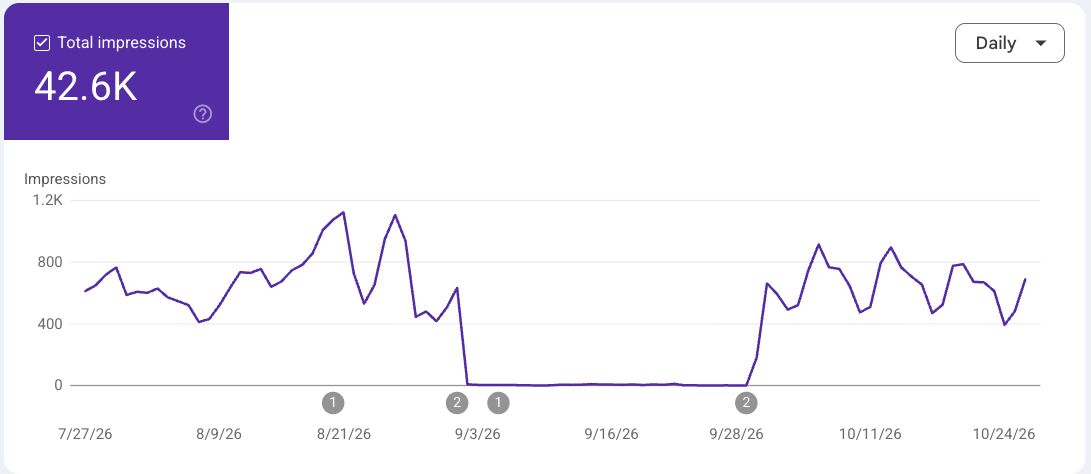
In late October 2026, Search Engine Roundtable published a concise yet revealing study by Cyrus Shepard that measured the click‑through rate (CTR) of Google’s new AI‑powered search features – AI Overviews and AI Mode. The data, derived from a controlled opt‑out experiment, shows that these AI features generate only 0.9% CTR for the sites that appear in the AI Overviews pane. Even more striking, when a site was deliberately hidden from the AI Overviews and AI Mode via Google’s opt‑out controls, its main web result clicks dropped noticeably.
The experiment was simple: Shepard compared impressions, clicks, and CTR for a single website while it was visible in the AI Overviews and again after it was removed from the AI interface. The results paint a clear picture: AI Overviews are not a magic funnel for traffic, and hiding from them can hurt your organic click‑through.
Key Details
- 0.9% CTR for AI Overviews – The only publicly available figure for how often users click AI‑generated snippets.
- Opt‑out impacts – Removing a site from the AI pane leads to a measurable drop in clicks for the standard SERP results.
- AI Overviews still appear – Even when a site is hidden from the AI pane, its content may still show in the traditional search results, but the overall visibility is reduced.
- Small‑study, large implications – Although the sample size was limited, the consistency across multiple metrics suggests a real trend.
- Relevance to local and small businesses – The study was conducted on a typical small‑business website, making the findings directly applicable to many local brands.
How the Opt‑Out Works
Google offers a Search Generative AI opt‑out control that lets webmasters decide whether their site appears in AI Overviews and AI Mode. Businesses can toggle this setting in their Search Console or via the new AI‑search controls. The study shows that once the toggle is turned off, the site’s appearance in AI Overviews disappears, and the overall CTR for that site’s main SERP listing can dip.
Why 0.9% Matters
A 0.9% CTR might sound low, but it is the average for AI‑generated snippets. For businesses with high search volumes, even a fraction of a percent can translate into dozens or hundreds of missed clicks per month.
What It Means For Your Business
1. Keep AI Visibility On
If you’re targeting local customers who rely on AI‑powered assistants like ChatGPT or Google AI, ensuring your site appears in AI Overviews can keep you in front of users who are looking for quick answers. Even if the CTR is modest, the reach of AI Overviews is wide.
2. Monitor Your SERP Performance
Track your site’s performance before and after toggling the opt‑out. Use Google Search Console to compare impressions and clicks. If you notice a decline, consider re‑enabling AI visibility.
3. Optimize for AI Snippets
Google’s AI Overviews pull from structured data and high‑quality content. By adding schema markup (e.g., LocalBusiness, Product, Review), you can improve the chances of your business appearing in AI Overviews. The better your structured data, the more likely Google’s AI will use your content.
4. Combine AI and Traditional SEO
AI Overviews should complement, not replace, classic SEO. Maintain strong on‑page optimization, local listings, and backlink profiles. The AI features are an additional channel, but the foundation of SEO remains critical.
5. Stay Informed About AI Updates
Google frequently updates its AI search features. Keep an eye on Search Engine Roundtable and other industry blogs for new metrics and best practices. Being proactive can help you adapt quickly and avoid losing clicks.
Practical Steps for Small Businesses
- Enable AI Visibility – Turn on the AI opt‑out setting in Search Console.
- Add Schema Markup – Use JSON‑LD for LocalBusiness, FAQs, and Reviews.
- Publish AI‑friendly Content – Write concise, answer‑oriented paragraphs that AI can summarize.
- Track Metrics – Monitor CTR, impressions, and position changes in Search Console.
- Adjust Strategy – If you see a drop after opt‑out, revert the setting or refine your content.
By following these steps, you can harness the reach of Google’s AI features while safeguarding your traditional search performance.
Bottom Line
The 0.9% CTR figure underscores that AI Overviews are not a silver bullet, but they are a valuable addition to a well‑rounded SEO strategy. For local and small businesses, staying visible in AI‑powered search can mean the difference between capturing a quick answer seeker and missing out on a potential customer. Keep your site in the AI pane, optimize for AI snippets, and monitor your results – your clicks will thank you.
Why This Matters For Your Business
In today’s digital landscape, a growing number of consumers turn to AI assistants—ChatGPT, Perplexity, Gemini, and Google AI—to get instant answers. These AI tools pull information from the web, often displaying *AI Overviews* that summarize key points. If your local business is invisible in this AI layer, you’re essentially invisible to a large segment of searchers. For businesses that rely on being discovered online, missing out on even a fraction of the AI‑search traffic can translate into lost leads, appointments, and sales. By understanding the 0.9% CTR figure and the impact of the opt‑out mechanism, you can make informed decisions about how your brand appears in AI‑search results. Optimizing for AI visibility ensures that when a potential customer asks a question, your business is among the first answers they see, increasing the likelihood of a click and a conversion. Moreover, AI search is still evolving. Early adopters who maintain AI visibility and continuously refine their content for AI summarization will position themselves ahead of competitors who ignore this new frontier. VisibilityAI’s mission is to help local and small businesses get discovered by these AI tools, and staying on top of metrics like the 0.9% CTR is a key part of that strategy.
Frequently Asked Questions
What is AI Overviews?
AI Overviews are concise AI‑generated summaries that appear next to traditional search results, providing quick answers to user queries.
How does the opt‑out feature work?
Webmasters can toggle the AI opt‑out setting in Google Search Console to hide or show their site in AI Overviews and AI Mode.
Will turning off AI visibility hurt my SEO?
Yes, the study shows that opting out can reduce overall click‑through to the main SERP results, so keeping AI visibility on is generally recommended.
Is your business showing up in AI search?
Get your free AI visibility audit - see if ChatGPT, Perplexity, and Google AI actually recommend you.