
Home / News / Bing Tests Sleek Faded Line Separators: What It Means for Your Business
Bing Tests Sleek Faded Line Separators: What It Means for Your Business
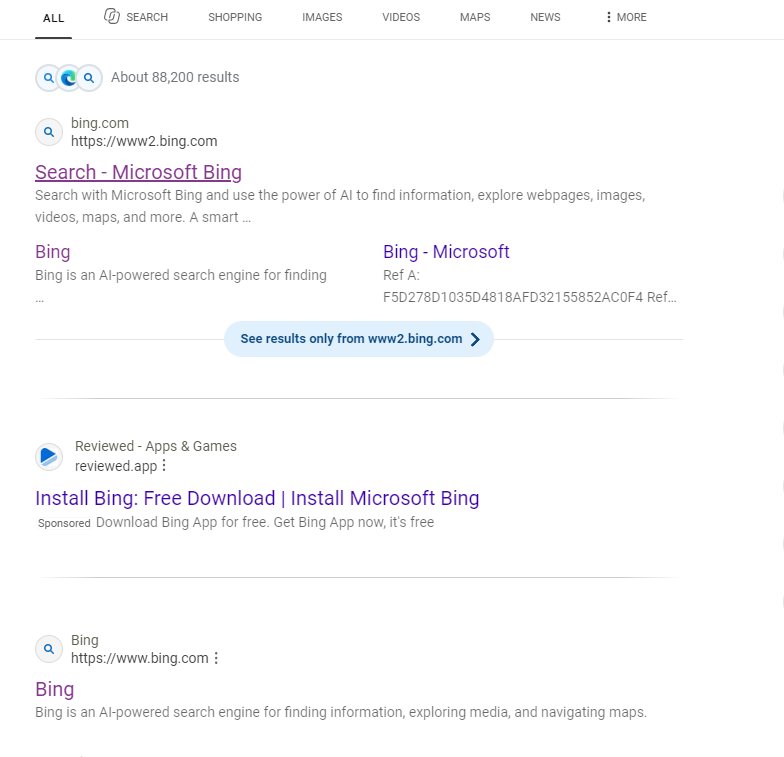
Microsoft Bing is testing a subtle visual tweak that fades the dividing lines between search results. The change is purely cosmetic but could make local listings stand out more and improve the formatting of snippets used by AI assistants.
Key Highlights
- ✓Bing’s new faded line separators improve UI clarity
- ✓The change is purely visual, no ranking impact
- ✓A cleaner design may enhance AI snippet quality
- ✓Businesses can optimize titles to stand out
What Happened\n\nMicrosoft’s Bing Search team has introduced a small visual tweak: **faded line separators** at the end of each search result line. The new effect lightens the dividing lines, giving the results page a cleaner, less cluttered feel.\n\n## Key Details\n\n- **Design update**: The separators now fade instead of staying solid, cutting visual noise.\n- **Testing phase**: Bing is running A/B tests with a subset of users to gauge how the change is received.\n- **Broader UI refresh**: This tweak is part of a larger effort to modernise Bing’s interface and improve readability.\n- **No impact on rankings**: The change is purely aesthetic; it does not alter how Bing evaluates or displays results.\n\n## What It Means for Your Business\n\n### 1. Cleaner Search Experience\nA less busy search page lets users focus on the content that matters most—your business listing. When your local business appears in the results, it may stand out more clearly against a subtle background.\n\n### 2. Better Visibility in AI‑Powered Tools\nAI assistants such as ChatGPT, Gemini, and Google AI often pull data from Bing. A cleaner UI can translate into more accurate, well‑formatted snippets that AI tools use when answering user queries. This could improve the quality of citations and the likelihood that your business gets referenced.\n\n### 3. Opportunity for Visual Optimization\nWith the new faded lines, the contrast between your business name and the surrounding text changes. Optimize your title tags and meta descriptions to ensure they still pop against the lighter separators. Adding bold or colored keywords can help maintain visual prominence.\n\n### 4. Stay Ahead of Trends\nMicrosoft’s UI experiments often precede larger updates. By monitoring these changes, you can anticipate future adjustments to search algorithms or display formats and adapt your local SEO strategy accordingly.\n\n## Take Action\n\n- **Audit your listings**: Ensure your business name, address, and phone number are accurate and consistent across directories.\n- **Optimize snippet content**: Craft concise, keyword‑rich titles that will stand out even with a lighter separator.\n- **Monitor Bing updates**: Keep an eye on Bing’s release notes or SEO blogs for further UI tweaks that could affect visibility.\n- **Leverage AI tools**: Use VisibilityAI to track how your business is cited across AI platforms and adjust your strategy based on real‑time data.\n\nBy staying informed about these subtle UI changes, you can position your local business to thrive in both traditional search results and the emerging AI‑powered ecosystem.
Why This Matters For Your Business
Why It Matters:\n\nFor local and small businesses, visibility is everything. When Bing’s search results become cleaner, the emphasis shifts to the content itself—your business information, reviews, and call‑to‑action buttons. A subtle UI change like faded separators can make your listing more readable and memorable, which is especially important when users quickly scan for answers.\n\nMoreover, AI assistants such as ChatGPT, Gemini, and Google AI increasingly rely on Bing’s data to generate responses. A cleaner, well‑structured snippet is more likely to be parsed correctly by these models, leading to higher quality citations and a stronger presence in AI‑generated content. This, in turn, boosts your credibility and drives more traffic.\n\nBy proactively adapting your SEO and local listings to these visual updates, you ensure that your business remains front‑and‑center—both in traditional search and the rapidly growing AI ecosystem.
Frequently Asked Questions
Will the faded line separators affect my search ranking?
No, the change is purely aesthetic and does not influence Bing’s ranking algorithm.
How can I prepare for this UI change?
Audit your listings, refine your titles and descriptions, and keep an eye on Bing’s announcements for any additional UI tweaks.
Will this affect how my business appears in AI tools?
A cleaner UI can lead to better‑formatted snippets, which may help AI assistants reference your business more accurately.
Is your business showing up in AI search?
Get your free AI visibility audit - see if ChatGPT, Perplexity, and Google AI actually recommend you.