
Home / News / Bing Tests “Popular Links” Labels on Search Snippets – What It Means for Your Business
Bing Tests “Popular Links” Labels on Search Snippets – What It Means for Your Business
Microsoft is piloting a “Popular Links” badge on Bing sitelinks, a visual cue that highlights the most‑clicked pages on a site. The test mirrors Google’s recent “Top Pages” experiment and could change how local businesses gain visibility in AI‑driven search results.
Key Highlights
- ✓Bing adds a “Popular Links” badge to sitelinks in test phase
- ✓Badge highlights pages with high click‑through and engagement
- ✓Similar to Google’s Top Pages experiment but with a visual label
- ✓Potential boost for local businesses and AI citation visibility
What Happened
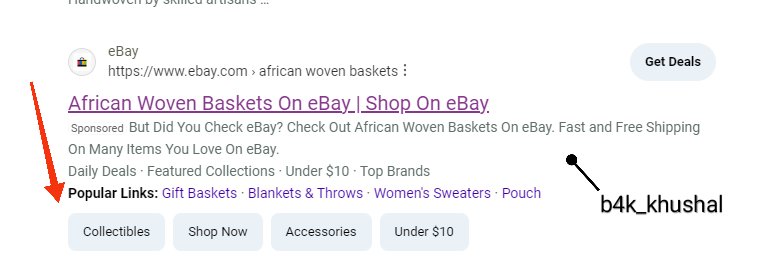
Microsoft has started testing a new visual cue in Bing’s search results: a “Popular Links” label attached to sitelinks beneath a primary result. The badge spotlights the pages that receive the most clicks, echoing Google’s recent “Top Pages” experiment. The trial is limited to a subset of queries and regions, but it underscores Bing’s effort to surface the most relevant content more transparently.
Key Details
- Label Placement – The “Popular Links” tag appears next to individual sitelinks under the main result, using a small badge that reads Popular Links.
- Selection Criteria – Bing selects these links based on click‑through data, dwell time, and overall user engagement, aiming to surface the pages users find most useful.
- Test Scope – The rollout is confined to English‑language queries in the United States and a few other markets. Microsoft says the test will run for several weeks before a broader release.
- Comparison to Google – Google’s “Top Pages” test follows a similar logic, surfacing high‑traffic pages from a site. Bing’s version adds a visual badge, which could make the highlighted links stand out more prominently.
- Impact on SERP Layout – The badge slightly expands the vertical space of the result, potentially pushing down other organic listings.
What It Means For Your Business
1. **Visibility Boost for High‑Performing Pages**
When a page on your site consistently attracts clicks and engagement, Bing may flag it as a Popular Link. That badge can place the page in a prime spot on the results page, driving extra traffic without additional SEO effort.
2. **Incentive to Optimize Core Content**
The test rewards pages that already perform well. Audit your most visited pages and fine‑tune load speed, mobile friendliness, and relevance to user intent. Stronger user signals increase the odds of earning the label.
3. **Citations for AI‑Powered Tools**
VisibilityAI helps small businesses get cited by AI assistants such as ChatGPT, Gemini, and Google AI Overviews. Those tools often draw from top‑ranked pages. A Popular Link badge signals authority to AI models, raising the chance of being cited in AI‑generated answers.
4. **Local SEO Advantages**
Local firms with robust Bing Places or Google My Business profiles usually see higher click‑through rates on service‑specific pages (e.g., hours, menu, appointments). Those pages could surface as Popular Links, giving local searchers a quick path to the information they need.
5. **Strategic Link Building**
External backlinks remain valuable, but internal link equity becomes crucial. Funnel traffic to your most valuable pages through strategic internal linking, newsletters, and social posts to boost the metrics Bing uses for selection.
Action Steps
- Identify your top‑performing pages with Google Search Console, Bing Webmaster Tools, or your analytics platform.
- Enhance on‑page SEO: clear headings, concise meta descriptions, and schema markup for FAQs and local business info.
- Improve UX: fast load times, mobile‑responsive design, and obvious calls‑to‑action.
- Encourage user engagement: interactive elements, reviews, and easy navigation keep dwell time high.
- Monitor Bing SERP changes: tools like SERPWatcher or Ahrefs can help you track whether your pages acquire the Popular Links badge.
Bottom Line
Bing’s Popular Links experiment signals a shift toward behavioral signals for surfacing the most useful content. For small and local businesses, the opportunity lies in doubling down on pages that already attract visitors, ensuring they receive the extra visual boost that can translate into more traffic, higher AI citations, and ultimately, more customers.
---
VisibilityAI Tip: Leverage our citation‑building service to embed structured data on your top pages. When AI tools scrape the web, that structured data helps them recognize your business as a credible source, increasing the chance of being featured in AI‑generated answers.
Why It Matters
For businesses that depend on organic search and AI‑driven discovery, the Popular Links badge does more than add a decorative label. It tells both human users and AI models that a page is trusted and frequently accessed. AI assistants like ChatGPT and Gemini pull from high‑engagement content when answering queries; a Bing‑flagged popular page is more likely to appear in those answers, giving your business a citation advantage.
Local businesses often compete for a narrow set of high‑intent keywords—think “best coffee shop near me.” A Popular Links badge can elevate a service or location page to the top of the SERP, reducing reliance on aggressive paid campaigns. By focusing on pages that naturally earn clicks, you can optimize resources, improve user experience, and strengthen the signals AI tools use to generate trustworthy recommendations.
Why This Matters For Your Business
The *Popular Links* badge functions as a trust signal for both people and AI. When Bing highlights a page, it indicates strong user engagement, which AI assistants such as ChatGPT and Gemini prioritize when sourcing answers. This extra layer of credibility can translate into more frequent citations of your content in AI‑generated responses, expanding your reach beyond traditional search traffic. For local businesses, the badge can be a game‑changer. Competing for high‑intent keywords like “best pizza near me” often requires costly ad spend. If a service or location page earns the *Popular Links* label, it can climb to a more prominent position in the SERP without additional investment, funneling qualified visitors directly to the information they need and improving overall conversion rates.
Frequently Asked Questions
Will the “Popular Links” badge appear for all Bing users?
No. Microsoft is currently testing the feature with a limited audience in select regions and languages. Results may vary until the rollout is complete.
How does Bing decide which links become “Popular Links”?
Bing uses engagement metrics such as click‑through rate, dwell time, and overall traffic to identify the most valuable pages on a site.
Can I influence which of my pages get the badge?
Yes. Optimize high‑traffic pages for speed, mobile usability, and clear, relevant content. Promote those pages through internal linking, newsletters, and social media to boost engagement.
Is your business showing up in AI search?
Get your free AI visibility audit - see if ChatGPT, Perplexity, and Google AI actually recommend you.