
Home / News / Bing Tests Editable Image Labels: What It Means for Small Businesses
Bing Tests Editable Image Labels: What It Means for Small Businesses
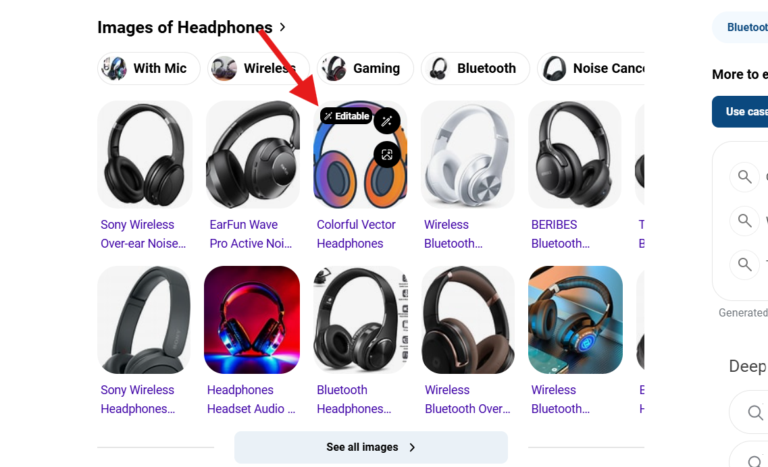
Microsoft Bing is piloting an editable icon on search‑result images, allowing users to modify captions through Bing’s AI editor. The changes are indexed in near real‑time, giving businesses a new way to shape how their visuals appear in AI‑driven search results.
Key Highlights
- ✓Editable icon appears on Bing image results for instant caption tweaks
- ✓AI processes label changes and updates Bing's index in near real‑time
- ✓Optimized captions can improve local SEO and AI‑generated citations
- ✓Early adopters gain a competitive edge in AI‑driven search visibility
Summary: Microsoft Bing is trialing editable captions on search images, letting users tweak labels with AI. Learn how this new feature can boost your local SEO, AI citations, and visual brand control.
Content:
What Happened
Microsoft Bing is testing a new feature that places an editable icon on images in its search results. When users hover over the icon, they can click to open Bing’s AI‑powered image editor, which lets them adjust the caption or label that appears beneath the picture. The edit is saved to the search index, meaning future queries may show the revised label instead of the original.
The test is being rolled out in two formats: a small pencil‑shaped button that appears in the lower‑right corner of the thumbnail, and a larger “Edit label” overlay that shows up when the image is expanded. Both versions feed the user‑generated text back into Bing’s AI model, which then re‑ranks or re‑describes the image for subsequent searches.
Key Details
- Two icon styles – a discreet pencil icon on the thumbnail and a full‑size “Edit label” button on the enlarged view.
- AI‑driven editing – changes are processed by Bing’s generative AI, which can suggest alternative wording, add keywords, or correct errors.
- Live indexing – edited labels are written to Bing’s index in near real‑time, so the next user who sees the image may see the new caption.
- Limited rollout – the feature is currently in a test phase for English‑language results in the United States, with plans to expand based on feedback.
- Privacy safeguards – Microsoft says edits are anonymized and only affect the public snippet, not the original image file on the host site.
What It Means For Your Business
1. **Control Your Visual Narrative**
For local retailers, restaurants, and service providers, images are often the first thing a potential customer notices. If a competitor’s photo appears in Bing with a vague or inaccurate caption, you lose click‑throughs. With editable labels, you—or even a savvy customer—can refine the description to highlight your unique selling points, such as “hand‑crafted vegan pastries – Downtown Bakery.”
2. **Boost AI‑Powered Citations**
AI chat tools like ChatGPT, Perplexity, and Google’s AI Overview pull data from search indexes to answer user queries. When Bing’s index contains a clear, keyword‑rich label, those AI systems are more likely to surface your business as a citation. Editing the label gives you a direct line into the data that powers the next generation of “answer engines.”
3. **Improve Local SEO Signals**
Search engines treat image captions as supplemental text that reinforces page relevance. A well‑crafted label that includes city names, service types, or brand keywords can strengthen your local SEO. Because Bing is integrating AI‑generated edits into its ranking algorithm, a concise, optimized caption can translate into higher placement in both image and web results.
4. **Encourage User‑Generated Optimization**
The editable icon invites customers to contribute. When a satisfied client updates a label to read “5‑star family‑friendly dentist in Austin,” you gain a free, authentic endorsement that Bing’s AI will recognize. This crowdsourced optimization can amplify word‑of‑mouth in the AI‑driven search landscape.
5. **Stay Ahead of the Competition**
Not all businesses will adopt this feature immediately. Early adopters who proactively edit their image labels can lock in better visibility before the field catches up. Monitoring the test and adjusting your visual assets accordingly can become a competitive advantage in a market where AI is reshaping discovery.
Practical Steps to Leverage Editable Labels
1. Audit your current image results – Search for your brand on Bing and note which images appear and what captions they carry.
2. Identify high‑value assets – Prioritize photos that showcase flagship products, storefronts, or team members.
3. Craft SEO‑friendly captions – Include location, service, and brand keywords in a natural, readable way.
4. Use the edit icon – When you see the pencil, click and apply your refined label. Test both icon formats to see which yields better results.
5. Track performance – Use Bing Webmaster Tools and your own analytics to measure changes in click‑through rates, impressions, and AI citation frequency.
By treating image labels as a living part of your SEO strategy, you turn a simple visual cue into a powerful discovery engine for AI‑driven search.
Why It Matters: For businesses that rely on local discovery, visual assets are a critical touchpoint. Bing’s editable image labels give owners direct control over the text that AI systems use to describe their photos. By fine‑tuning those captions with relevant keywords, you increase the chances that AI chat tools and answer engines will cite your brand when users ask for recommendations. This new layer of optimization works alongside traditional SEO, creating a dual pathway to visibility.
Moreover, the feature turns customers into collaborators. When satisfied patrons edit a label to highlight a specific service or location, that user‑generated content is instantly fed into Bing’s AI, amplifying authentic, location‑specific signals that search algorithms love. In a landscape where AI is becoming the primary gateway to information, having a say in how your business is described at the image level can be the difference between appearing in a top answer or being buried in the results.
FAQs: [{"question":"How do editable image labels work on Bing?","answer":"When you click the pencil or \"Edit label\" icon on a search image, Bing opens an AI‑powered editor where you can type a new caption. The revised text is sent to Bing’s index, and future searches may display the updated label."},{"question":"Will editing a label affect the original image on my website?","answer":"No. The edit only changes the snippet shown in Bing’s search results. The source file on your site remains unchanged, preserving your original content."},{"question":"Can I use this feature to add SEO keywords to my images?","answer":"Yes. Adding relevant local keywords, brand names, or service descriptors in the edited label can help Bing’s AI associate your image with those terms, improving both image ranking and AI citation potential."}]
Why This Matters For Your Business
Visual assets are often the first impression a potential customer gets, especially for local businesses. By giving owners the ability to edit the captions that AI reads, Bing lets you steer the narrative and improve the odds that AI assistants will reference your brand when users ask for recommendations. This control works hand‑in‑hand with classic SEO tactics, creating two parallel routes to higher visibility. The editable label also transforms satisfied customers into contributors. When a patron updates a caption to highlight a specific service or location, that authentic, user‑generated text is fed directly into Bing’s AI, strengthening the local signals that search algorithms prioritize. In an AI‑first search world, that extra layer of relevance can be the deciding factor between a top answer and obscurity.
Frequently Asked Questions
How do editable image labels work on Bing?
When you click the pencil or "Edit label" icon on a search image, Bing opens an AI‑powered editor where you can type a new caption. The revised text is sent to Bing’s index, and future searches may display the updated label.
Will editing a label affect the original image on my website?
No. The edit only changes the snippet shown in Bing’s search results. The source file on your site remains unchanged, preserving your original content.
Can I use this feature to add SEO keywords to my images?
Yes. Adding relevant local keywords, brand names, or service descriptors in the edited label can help Bing’s AI associate your image with those terms, improving both image ranking and AI citation potential.
Is your business showing up in AI search?
Get your free AI visibility audit - see if ChatGPT, Perplexity, and Google AI actually recommend you.