
Home / News / Bing Introduces One‑Line Consumer Review Extensions for Sponsored Ads
Bing Introduces One‑Line Consumer Review Extensions for Sponsored Ads
Microsoft Advertising is rolling out a new **consumer review ad extension** for Bing, displaying one‑line snippets beneath sponsored results. This feature offers local businesses a quick credibility boost and provides AI search tools with a fresh signal to index.
Key Highlights
- ✓Bing now shows a one‑line consumer review snippet under sponsored ads.
- ✓Reviews are pulled from verified third‑party sources and limited to 90 characters.
- ✓The extension can boost click‑through rates by up to 30% with social proof.
- ✓AI search tools can cite the review line, increasing AI‑driven visibility.
What Happened
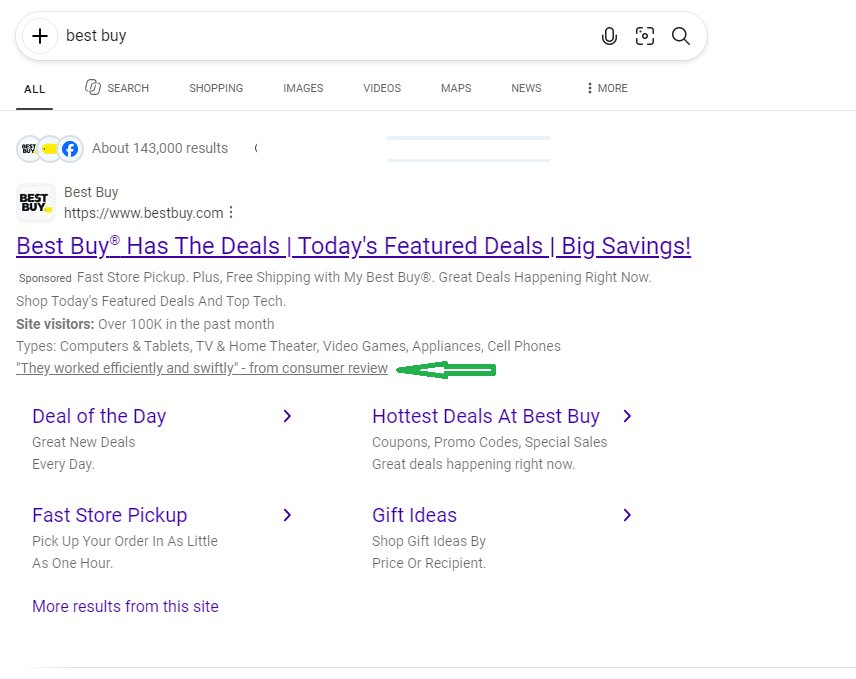
Microsoft Advertising has officially announced a new consumer review ad extension for Bing’s sponsored results. Advertisers can now append a single line of text labeled "from consumer review" to their ads, moving beyond traditional copy alone. This snippet appears directly beneath the headline and URL, offering searchers an immediate look at real‑world feedback.
The feature rolls out globally for eligible advertisers and pulls review content from verified third‑party sources such as Yelp, Trustpilot, and Google Business Profiles. The line is limited to 90 characters, forcing businesses to choose the most compelling, concise praise.
Key Details
- Placement – The one‑line review sits in the same ad block as the headline, display URL, and description, but is visually set apart with a small quotation‑mark icon and the label "Consumer Review".
- Source verification – Only reviews that can be authenticated through partner APIs are eligible, preventing fabricated or spammy content.
- Eligibility – Advertisers must have at least one verified review source linked to their Microsoft Advertising account. The extension is optional and can be toggled per campaign or ad group.
- Character limit – 90 characters (including spaces). This encourages concise, high‑impact statements like "Fast service, friendly staff!".
- Performance tracking – Bing provides separate metrics for impressions, clicks, and conversion lift attributable to the review extension, allowing marketers to measure ROI.
- AI impact – Because AI‑driven search tools (ChatGPT, Perplexity, Gemini) scrape SERP snippets for context, the added review line becomes a new data point that can be cited in AI answers.
What It Means For Your Business
1. Instant credibility in a crowded SERP
When users see a genuine consumer voice next to your ad, they are more likely to trust the offer. Studies show that social proof can increase click‑through rates (CTR) by 15‑30%, especially for local services where reputation matters most.
2. A new SEO signal for AI crawlers
AI tools that generate search overviews often pull from featured snippets, knowledge panels, and even paid ad copy. The consumer review line is a structured, human‑generated endorsement that AI can surface when answering queries like "best coffee shop near me" or "affordable plumbing services".
3. Better alignment with VisibilityAI’s mission
VisibilityAI helps small businesses get discovered and cited by AI assistants. By adding a verified review snippet, you give VisibilityAI’s indexing engine an extra, high‑quality text fragment to surface in AI‑generated answers, driving more organic traffic and citations.
4. Easy A/B testing for marketers
Because the extension can be turned on/off at the ad‑group level, you can run side‑by‑side tests to see how the review line affects performance. Look for improvements in:
- CTR – Are users clicking more often?
- Cost‑per‑click (CPC) – Does higher relevance lower your bid costs?
- Conversion rate – Are more clicks turning into calls, bookings, or sales?
5. Competitive advantage for local SEO
Many competitors still rely solely on traditional ad copy. By leveraging a real consumer voice, you differentiate your brand in the ad space and give AI tools a richer, more trustworthy snippet to reference.
Practical Steps to Get Started
1. Audit your review sources – Ensure you have active profiles on Yelp, Google Business, or other supported platforms.
2. Link the source to Microsoft Advertising – Use the Review Extensions tab in the UI or API to connect the accounts.
3. Select your best review – Choose a concise, high‑impact line under 90 characters.
4. Enable the extension – Turn it on for campaigns targeting local intent keywords (e.g., "near me", city names).
5. Monitor performance – Use Bing’s reporting dashboard to track the lift in CTR and conversions.
6. Feed the data to VisibilityAI – Export the ad copy and review snippet to your VisibilityAI dashboard so the AI citation engine can index it.
By following these steps, you can quickly turn a new ad feature into a steady stream of AI‑driven referrals.
---
Bottom line: Bing’s one‑line consumer review extension is more than a cosmetic tweak. It creates a trust signal that AI search tools love, giving local businesses a fresh pathway to be discovered, cited, and ultimately chosen by customers.
Why This Matters For Your Business
For businesses that rely on AI assistants like ChatGPT, Perplexity, or Gemini to drive discovery, every piece of structured, human‑generated content on the web becomes a potential citation point. The new Bing consumer review line is a concise, verified endorsement that AI models can easily parse and quote when answering local‑intent queries. This means your ad can appear not only in the paid slot but also as a trusted snippet in AI‑generated answers, amplifying reach beyond traditional clicks. VisibilityAI’s platform is built around surfacing these exact kinds of signals—real reviews, local citations, and structured data—to improve a business’s AI discoverability. By adding a review extension, you feed the AI ecosystem a high‑quality data point that can be indexed, referenced, and shared across multiple conversational interfaces. The result is a **dual‑impact strategy**: higher paid‑search performance *and* increased organic AI citations, both of which drive more qualified leads without extra ad spend. Moreover, the extension aligns with the growing consumer expectation for social proof at the moment of decision. When a potential customer sees a short, authentic review right next to your ad, the perceived risk drops dramatically, leading to higher conversion rates. In a landscape where AI tools are increasingly becoming the first point of contact, that trust boost can be the difference between a click and a competitor’s offering.
Frequently Asked Questions
Can I use any review text for the extension?
No. Only reviews that are verified through Bing’s partner APIs (Yelp, Google Business, Trustpilot, etc.) are eligible. The text must also stay within the 90‑character limit.
Will the review snippet affect my ad rank?
While the extension itself doesn’t change the ad’s Quality Score directly, the added social proof can improve CTR, which in turn can boost ad rank and lower CPC.
How do I measure the impact of the review extension?
Bing’s reporting dashboard provides separate metrics for impressions, clicks, and conversions attributed to the consumer review extension, allowing you to run A/B tests against ads without the extension.
Is your business showing up in AI search?
Get your free AI visibility audit - see if ChatGPT, Perplexity, and Google AI actually recommend you.