
Home / News / Bing Ads in AI Overviews: Local Business Impact
Bing Ads in AI Overviews: Local Business Impact
Microsoft has started inserting paid ads into Bing’s AI‑generated search Overviews, placing a “Sponsored” slot directly above the AI answer. For local businesses this creates a new, high‑visibility channel but also adds competition for the AI real‑estate.
Key Highlights
- ✓Bing now shows paid ads in AI‑generated search overviews
- ✓Ads sit above AI answers, gaining high visibility
- ✓Local businesses can opt‑in via Bing Ads to capture AI traffic
- ✓VisibilityAI helps track and optimize AI‑search performance
What Happened
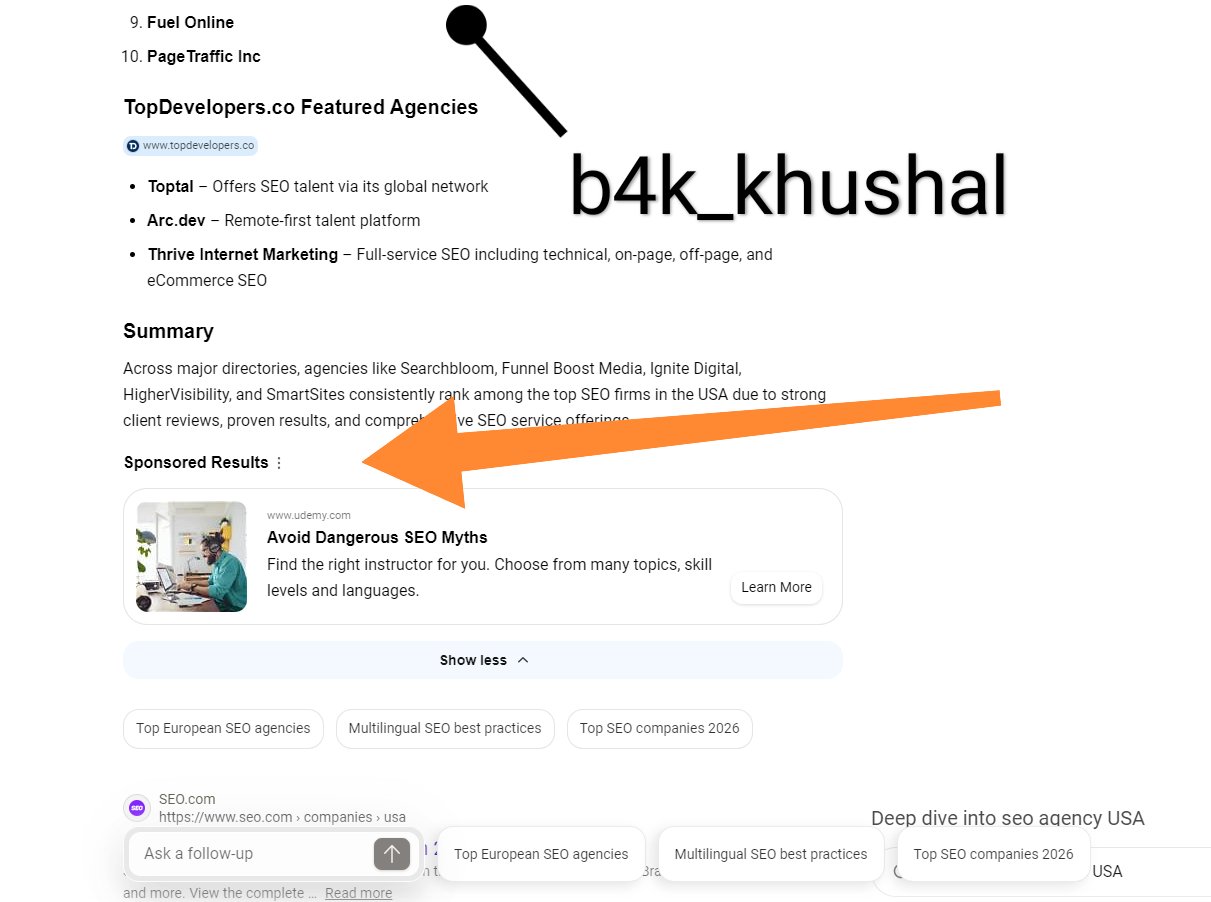
Bing, the search engine that powers Microsoft’s AI tools, has begun showing sponsored results inside its AI Overviews—the refreshed name for the Copilot Search box. A screenshot posted by Khushal Bherwani on X captures a paid ad placed directly beneath the AI‑generated summary, marking the first time Bing’s AI interface has displayed a commercial slot.
The rollout follows Microsoft’s broader effort to weave advertising into its generative‑AI products, echoing Google’s recent moves with its own AI features. Users can still scroll down to the classic list of organic results, but the AI Overview now opens with a “Sponsored” banner that includes a headline, description, and a call‑to‑action button.
Key Details
- Where it appears – The ad occupies the top of the AI Overview panel, clearly labeled Sponsored and accompanied by a concise headline, short description, and a CTA button.
- Targeting – Placement relies on the same intent‑ and location‑based signals that drive Bing’s regular ad serving.
- Visibility – Because the ad sits above the AI‑generated answer, it enjoys premium real‑estate and click‑through rates comparable to traditional SERP ads.
- Integration – Microsoft’s new AI ad platform draws from the existing Bing Ads inventory but formats the creative for the AI Overview layout.
- Opt‑in – Advertisers must enroll in the AI Overviews program; while not every campaign qualifies automatically, many local businesses can opt‑in with a few clicks.
Why It Matters for Small Businesses
1. Higher Competition in AI Space – As AI answers become the first thing users see, paid spots in that space increase the battle for attention.
2. New Revenue Stream for Ad Platforms – Bing is expanding its ad ecosystem, so local merchants should treat Bing Ads as a complement to Google rather than a secondary channel.
3. Impact on Organic Rankings – AI Overviews don’t directly alter traditional SERP rankings, but they can shift brand awareness and conversion patterns.
4. Opportunity for Local SEO – Bing’s AI leans heavily on local signals; businesses that optimize for Bing can capture traffic that would otherwise bypass the classic results page.
What It Means For Your Business
1. Expand Your Paid Search Portfolio
If you already run Google Ads, now is a good moment to pilot Bing Ads in the AI Overviews. The platform offers cost‑effective keyword targeting for local queries. Build a dedicated campaign with copy that spotlights your unique value proposition and a clear CTA.
2. Optimize Your Business Listings for Bing
Bing’s AI draws information from its local business database. Make sure your Bing Places profile is complete, up‑to‑date, and rich with high‑quality photos, timely responses to reviews, and accurate hours. A robust listing improves the odds of appearing organically—or as a paid slot—in the AI Overview.
3. Leverage VisibilityAI Insights
VisibilityAI can track where your brand shows up across AI‑driven search tools such as Bing, ChatGPT, and Gemini. Monitor impressions, click‑through rates, and conversions that originate from AI Overviews, then refine your copy, bids, and keyword list accordingly.
4. Prepare for Future AI‑Driven Search
Bing’s move underscores a larger trend: AI will soon dominate the search experience. Invest in content that answers common local questions, and use schema markup, FAQ pages, and structured data to give your site the best chance of being cited in AI responses.
5. Stay Updated on Platform Changes
Microsoft updates its AI features regularly. Subscribe to industry newsletters, join the Bing Ads community, and watch for policy revisions that could affect AI Overview placements.
Bottom Line
Bing’s new ad slot inside AI Overviews reshapes how local businesses reach customers. By adding Bing Ads to your mix, polishing your Bing Places profile, and using VisibilityAI for measurement, you can stay visible whether a shopper types a query or asks an AI assistant.
FAQs
- Do I need a separate Bing Ads account to run ads in AI Overviews?
Yes. You must have a Microsoft Advertising (formerly Bing Ads) account, create a campaign, and then opt‑in to the AI Overview targeting option.
- Will my existing Google Ads performance affect Bing’s AI ads?
Not directly. Bing’s AI Overviews use their own inventory, but insights from Google Ads—such as high‑performing keywords and ad copy—can inform your Bing strategy.
- How do I track conversions from AI Overviews?
Attach UTM parameters to your landing‑page URLs and enable Microsoft Advertising’s conversion tracking. VisibilityAI can then aggregate those signals with data from other platforms for a unified dashboard.
Why This Matters For Your Business
The emergence of paid placements inside AI Overviews changes the hierarchy of search results. Where users once scanned a list of organic links, they now encounter an AI‑generated answer first, and a sponsored slot sits directly above it. That prime position can capture attention before the user even considers the traditional SERP, making visibility in the AI layer as valuable as ranking on page one. For local businesses, the shift opens both risk and opportunity. On one hand, competitors can bid for the same AI real‑estate, intensifying the contest for immediate clicks. On the other, businesses that adopt Bing Ads early and keep their Bing Places profile current can tap into a new, intent‑rich traffic source that many marketers have yet to explore. Ignoring the AI layer could mean missing out on customers who prefer concise, AI‑driven answers over a list of links.
Frequently Asked Questions
Do I need a separate Bing Ads account to run ads in AI Overviews?
Yes. You must have a Microsoft Advertising (formerly Bing Ads) account, create a campaign, and then opt‑in to the AI Overview targeting option.
Will my existing Google Ads performance affect Bing’s AI ads?
Not directly. Bing’s AI Overviews use their own inventory, but insights from Google Ads—such as high‑performing keywords and ad copy—can inform your Bing strategy.
How do I track conversions from AI Overviews?
Attach UTM parameters to your landing‑page URLs and enable Microsoft Advertising’s conversion tracking. VisibilityAI can then aggregate those signals with data from other platforms for a unified dashboard.
Is your business showing up in AI search?
Get your free AI visibility audit - see if ChatGPT, Perplexity, and Google AI actually recommend you.